How to Use FreeLLMAPI
Updated 31 October 2026.
In short: FreeLLMAPI is a free, open-source (MIT)
router you run on your own computer. You add free API keys from providers such as Google, Groq,
Cerebras, Mistral and OpenRouter, and it serves all of them from one OpenAI-compatible address,
http://localhost:3001/v1, moving to the next model when one hits its limit. Its catalog lists
34 free providers, 635 free model endpoints and about 7.4 billion tokens a month of listed
free-tier capacity. That figure is the sum of the providers' free tiers, not tokens from FreeLLMAPI:
you only get what the keys you add allow.
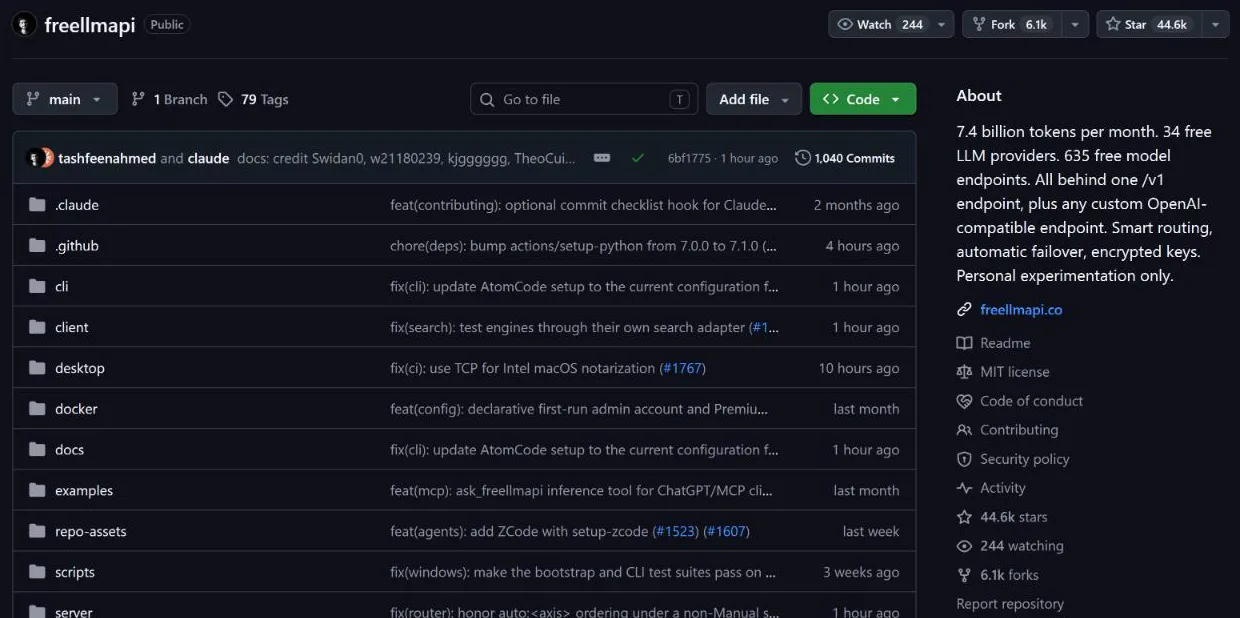
What is FreeLLMAPI
| Price | Free, MIT license. An optional paid "live catalog" costs $19 a year or $49 once |
| Runs on | Windows, macOS, Linux and ARM boards such as a Raspberry Pi (Node 20 or newer) |
| Address for your apps | http://localhost:3001/v1 with one unified key |
| Endpoints | Chat, responses, completions, embeddings, images, video, speech, transcription, models; also the Anthropic Messages API, Gemini and Ollama formats |
| Routing | Picks a model with a healthy key under its limits; on a 429 or 5xx error it retries the next model in your chain |
| Your keys | Stored encrypted (AES-256-GCM) in a local SQLite database |
The free version updates its model list from a monthly snapshot, so a new model reaches it 30 days after it is added to the live feed. The paid plan only makes that feed same-day; the router itself stays free.
Step 1: Install FreeLLMAPI
On Windows or macOS, download the desktop app from the repository's
Releases page: the .exe installer for
Windows, or the .dmg for macOS (arm64 for Apple Silicon, x64 for Intel). It runs from the tray and
needs no password.
With Docker (Linux, macOS or WSL), run the one-line installer. It creates ~/freellmapi,
generates an encryption key and starts the container:
curl -fsSL https://freellmapi.co/install.sh | bash
You can read the script at freellmapi.co/install.sh before running it. Running it again updates the container and keeps your keys.
Step 2: Add your free provider keys
- Open the dashboard at
http://localhost:3001(on the desktop app: tray icon, then Open Dashboard). - Go to the Keys page and add a key for each provider you have. Free keys come from each provider's own site; aiblogly's free AI API keys guide has the steps for each one.
- Reorder the Fallback Chain to choose which models are tried first.
- Copy your unified API key from the top of the Keys page. It starts with
freellmapi-.
Step 3: Use it from your code
Point any OpenAI client at the local address and the unified key. Use the model auto to let the
router choose, or auto:fast, auto:smart or a specific model ID:
from openai import OpenAI

client = OpenAI(base_url="http://localhost:3001/v1", api_key="freellmapi-your-unified-key")
resp = client.chat.completions.create(
    model="auto",
    messages=[{"role": "user", "content": "Say hello in one sentence."}],
)
print(resp.choices[0].message.content)
Each response has an X-Routed-Via header naming the provider and model that answered.
Step 4: Connect a coding agent
FreeLLMAPI works with Claude Code, Codex CLI, Gemini CLI, Cursor, Cline, Roo Code, OpenCode, Aider, Kilo Code and others. Most agents set themselves up with one command, for example Claude Code:
npx freellmapi setup-claude --url http://localhost:3001 --api-key <unified-key>
The command backs up the agent's existing config before changing it. Any other OpenAI-compatible tool
works with the base URL http://localhost:3001/v1 and the unified key.
Limits to know
- No frontier models and no uptime guarantee: it only reaches the free models of the keys you add.
- Daily caps: as top models hit their daily limits, answers come from smaller models later in the day; most limits reset at midnight UTC.
- Personal use: the project says it is for experimentation, not production, and each provider's own terms still apply to traffic sent through it.
- Single user: it is built to run locally for one person.
FreeLLMAPI vs OmniRoute
Both join free tiers behind one local OpenAI-compatible address. From each project's README:
| FreeLLMAPI | OmniRoute | |
|---|---|---|
| License | MIT | MIT |
| Local address | http://localhost:3001/v1 | http://localhost:20128/v1 |
| Install | Desktop app (Windows, macOS) or Docker | npm or Docker |
| Providers listed | 34 free providers, 635 free endpoints | 375 providers, 153 marked free |
| Tokens of its own | None | None |
Frequently asked questions
Is FreeLLMAPI free?+
Yes. The router is open source under the MIT license. An optional paid plan ($19 a year or $49 once) only makes its model catalog update the same day instead of monthly.
Where is FreeLLMAPI on GitHub?+
At github.com/tashfeenahmed/freellmapi, under the MIT license. The desktop installers for Windows and macOS are on its Releases page.
Does FreeLLMAPI give free tokens?+
No. It routes requests to the free tiers of providers you add your own keys for. The 7.4 billion tokens a month in its README is the sum of those providers' listed free tiers.
What is the FreeLLMAPI base URL?+
http://localhost:3001/v1, used with the unified key (starting freellmapi-) shown on the dashboard's Keys page. The model auto lets the router choose.
Can I use FreeLLMAPI with Claude Code?+
Yes. It serves the Anthropic Messages API, and npx freellmapi setup-claude --url http://localhost:3001 --api-key <unified-key> configures Claude Code.
Is FreeLLMAPI for production use?+
No. The project says it is for personal experimentation, with no frontier models and no service guarantee, and each provider's terms still apply.
More free API key tutorials
- How to get a Gemini API key for free
- How to get a Groq API key for free
- How to get a Cloudflare Workers AI API key for free
- How to get a Cohere API key for free
- How to get an OpenRouter API key for free
- How to get an Experimental Labs API key for free (with the $1 verification)
- How to get a Requesty API key for free
- How to use Kilo Code free models (no API key)
- How to get an LLM7 API key for free
- How to use a free AI API without an API key
- How to get an Ollama API key for free
- How to get a Gonka AI API key for free
- How to get a Perplexity API key for free
- Where Qwen is free
- Where Mistral models are free
- The Grok API, checked on a new account
- Where DeepSeek models are free
- Where GLM models are free
- Where OpenAI models are free
- Every free AI API and its daily limit
By model: DeepSeek · OpenAI (GPT) · Claude · Grok · Perplexity · Mistral · Kimi · Qwen · GLM · MiniMax · Llama · Nemotron · Gemma · gpt-oss
Want to use these APIs in a desktop app? OpenCode is a free, open-source AI coding app for Windows, Mac and Linux. How to add free API keys to OpenCode and pick a model.