How to Get an Ollama API Key for Free
Updated 26 October 2026.
In short: Ollama Cloud has a Free plan with an API key. Sign up at ollama.com, open Keys
and click Create API key. The Free plan includes a starter amount of usage each month on 7 cloud
models: Beam, Gemma 4 31B, gpt-oss 120B, gpt-oss 20B and three NVIDIA Nemotron 3 models. No credit
card is needed. The base URL https://ollama.com/v1 works in apps made for OpenAI.
What you need
- An Ollama account at ollama.com. New accounts start on the Free plan.
- A computer. Windows, Mac or Linux all work. The Ollama app is not needed to use the API.
- Nothing to pay: free usage comes with the account and refills every month.
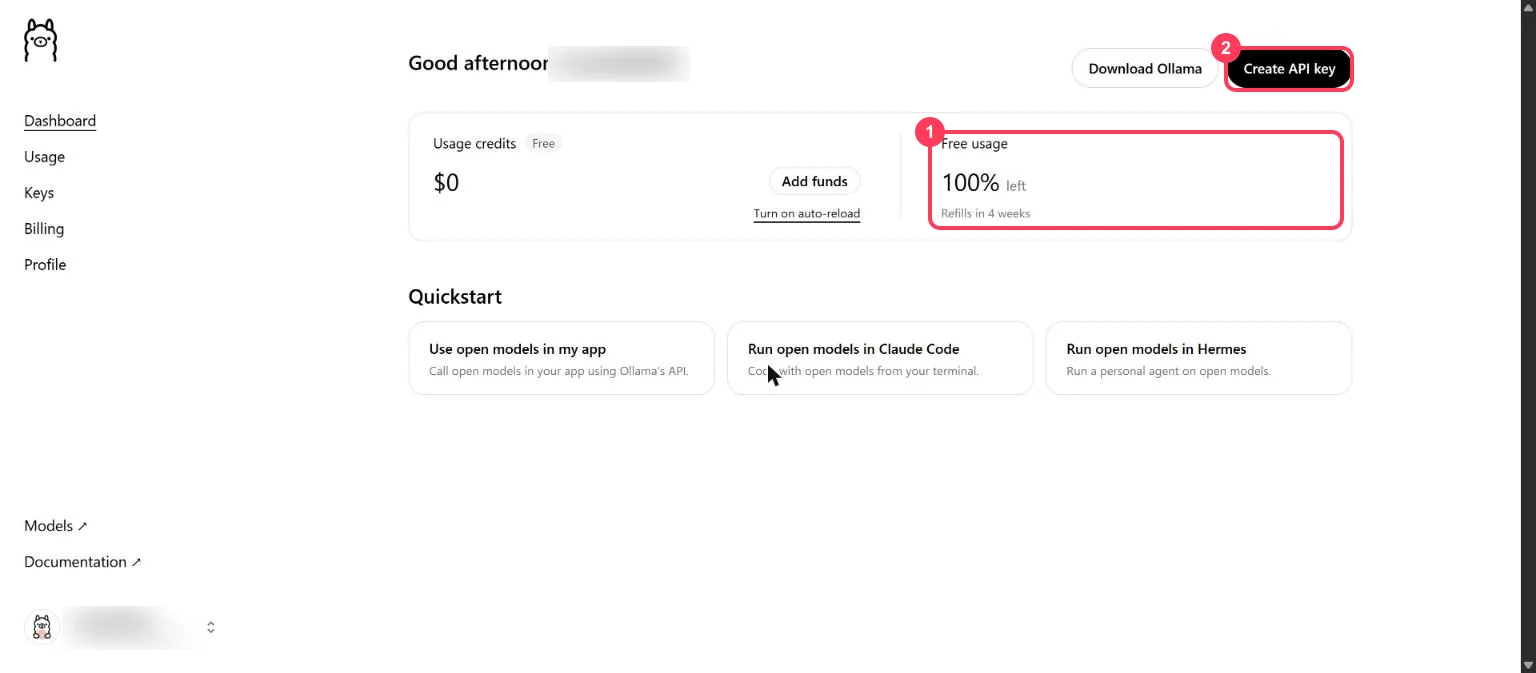
Step 1: Check your free usage
Sign in and open Dashboard. Free usage (box 1) shows how much of this month's free allowance is left and when it refills. Create API key (box 2) is at the top right.
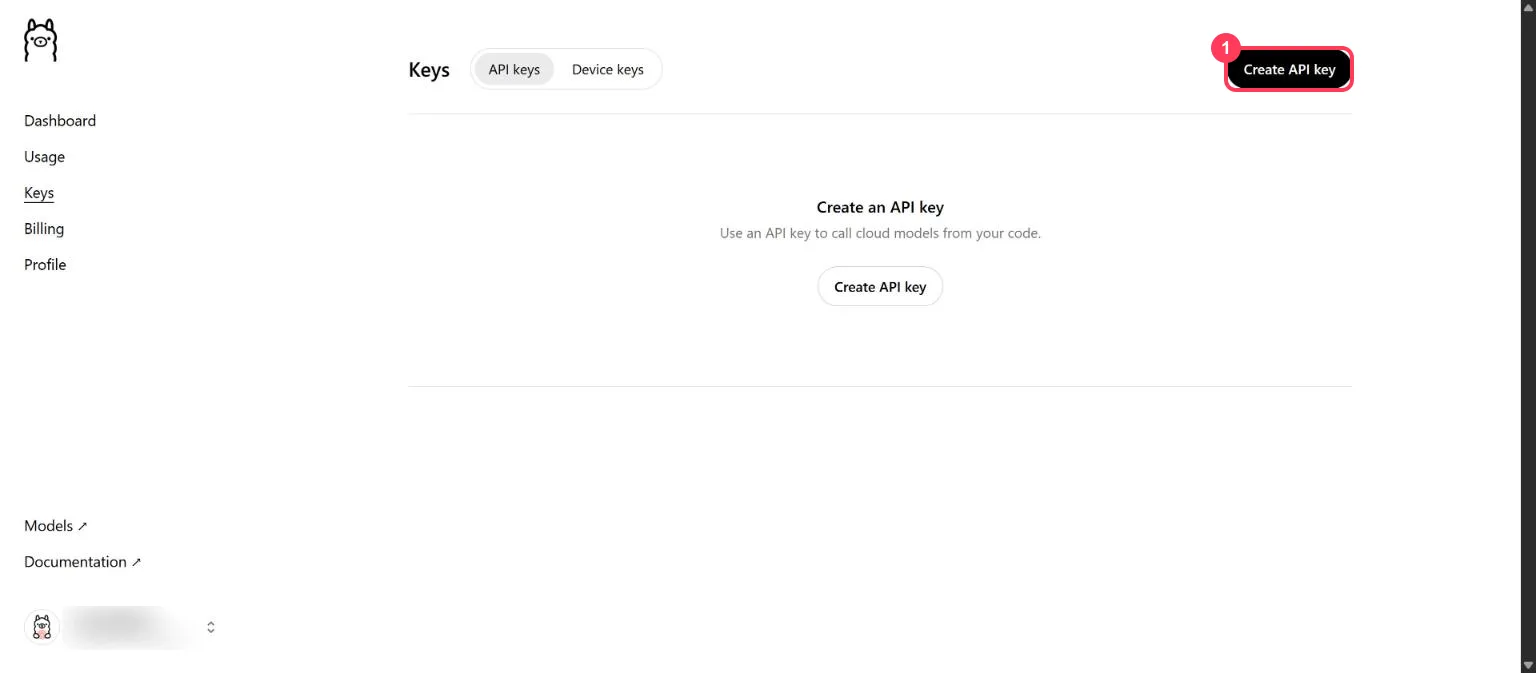
Step 2: Open the Keys page
Click Keys in the left menu, then Create API key (box 1).
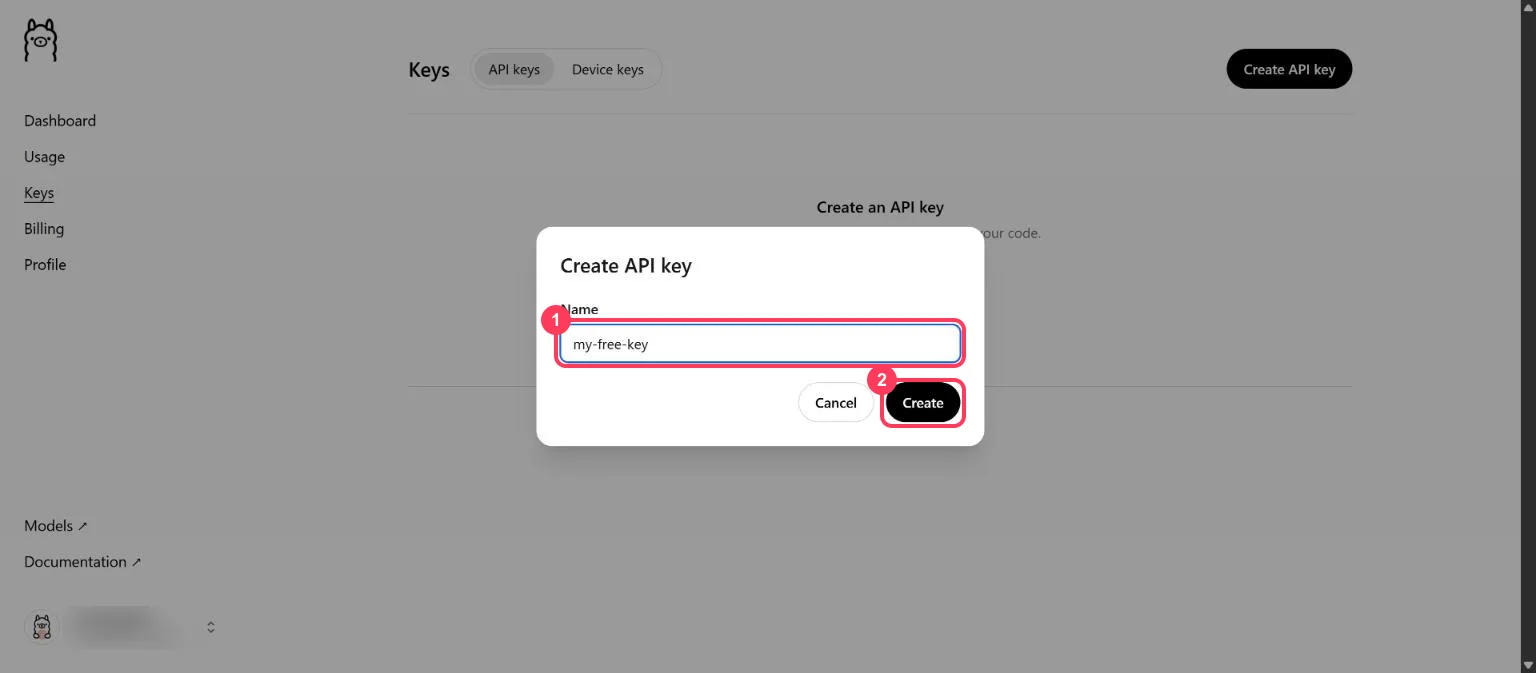
Step 3: Name the key and create it
Type a name you will recognise later, such as my-free-key (box 1), and click Create (box 2).
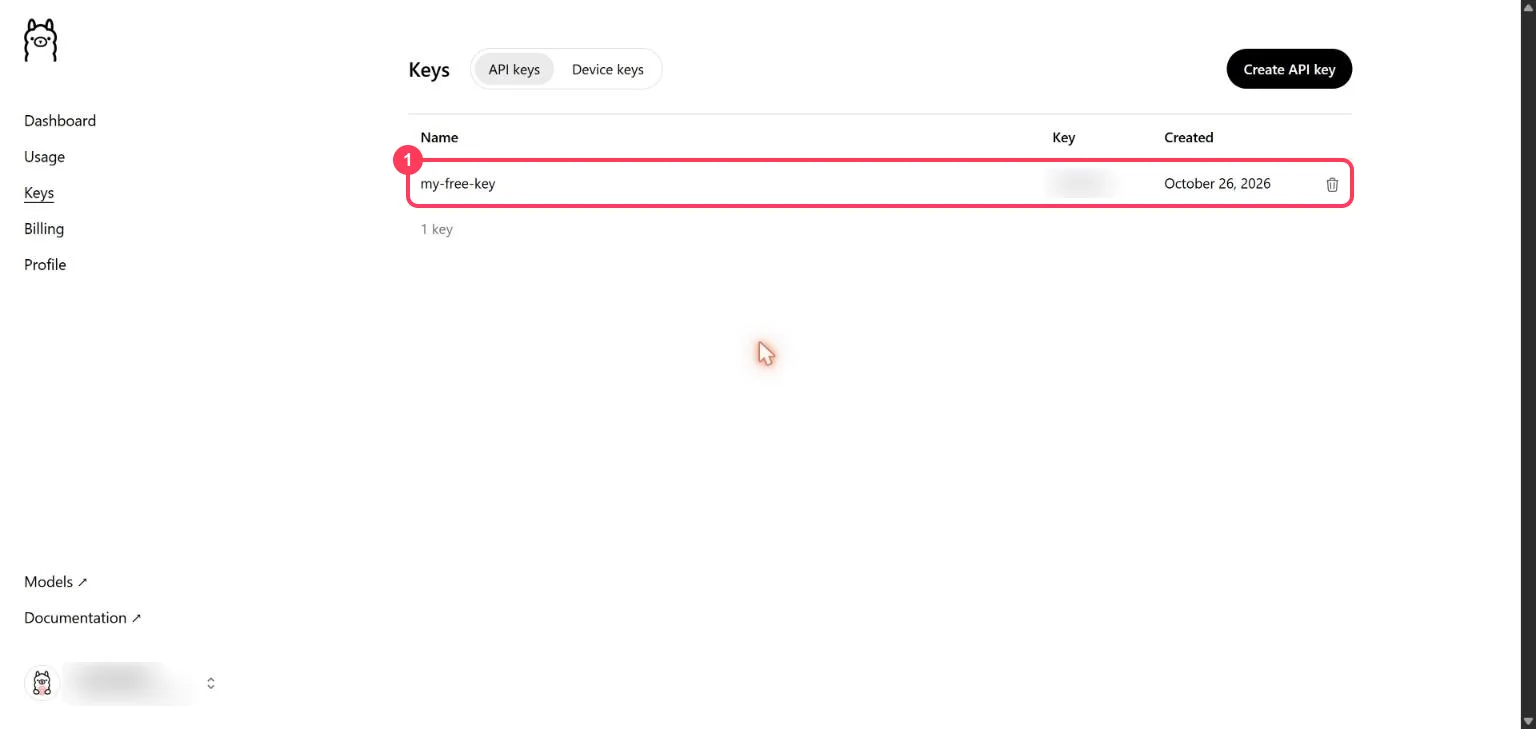
Copy the key as soon as it appears and keep it somewhere safe. Afterwards the Keys list shows only the first few characters of it (box 1).
Keep the key private:
- Anyone who has your key can use your free allowance.
- Never paste it into a website, a public code repository or a screenshot.
- If it leaks, click the bin icon next to it and create a new one.
Step 4: See which models are free
Open Usage in the left menu. The box under Usage breakdown (box 1) lists the cloud models the free usage works with.
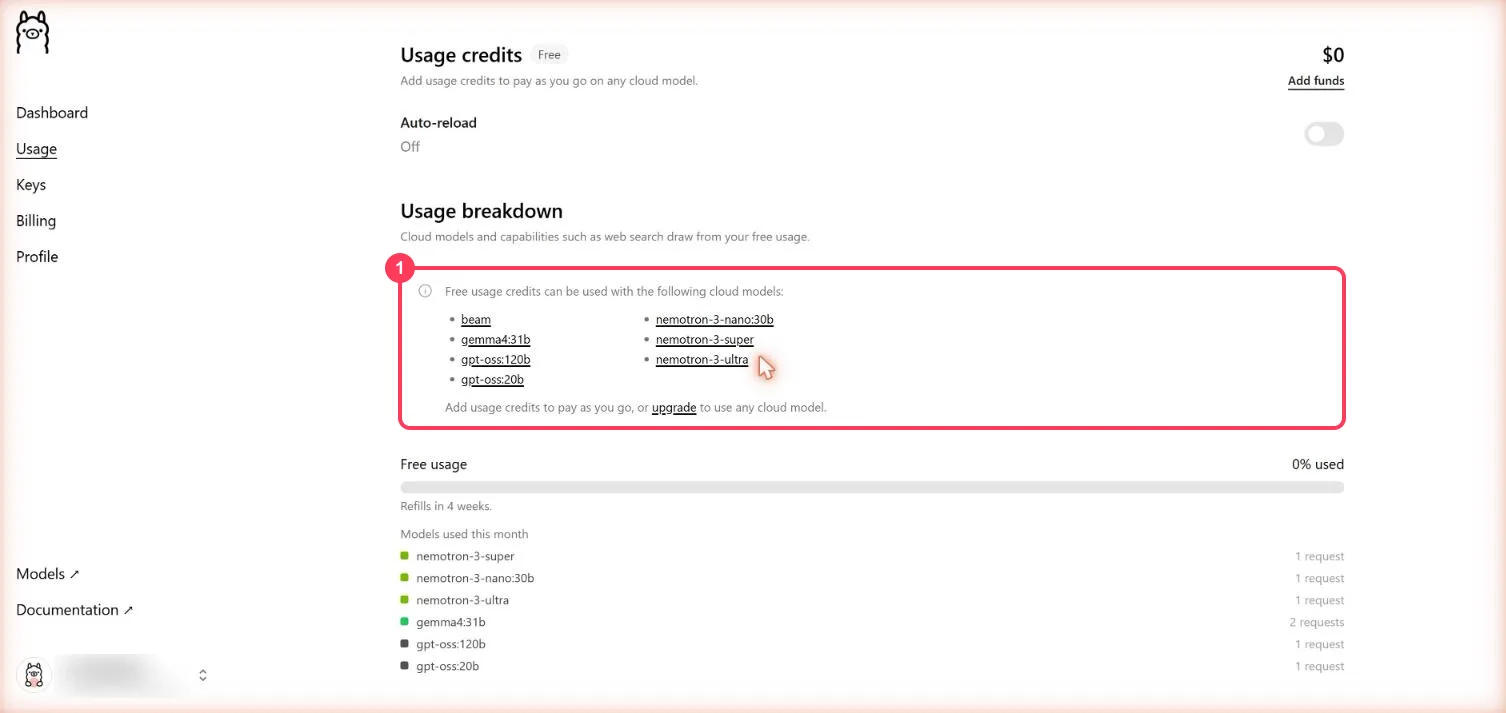
| Model name to use | What it is |
|---|---|
beam | Reflection's Beam (501B, mixture of experts), for coding and tool use |
gemma4:31b | Google's Gemma 4 31B |
gpt-oss:120b | OpenAI's open-weight gpt-oss, 120B |
gpt-oss:20b | OpenAI's open-weight gpt-oss, 20B |
nemotron-3-super | NVIDIA Nemotron 3 Super |
nemotron-3-ultra | NVIDIA Nemotron 3 Ultra |
nemotron-3-nano:30b | NVIDIA Nemotron 3 Nano, 30B |
All seven answered on a Free plan key on 26 October 2026. Other cloud models, such as DeepSeek, GLM,
Kimi and MiniMax, answer with error 402 and the message "This model is not in the Free plan".
Step 5: Know your free limits
| What | Free plan |
|---|---|
| Price | $0 |
| Usage | A starter amount each month, shown as a percentage on the Dashboard |
| Refill | Monthly, counted from the day you signed up |
| Requests at a time | 1; extra requests wait in a queue |
| Models | The 7 listed in Step 4 |
Ollama does not publish the free allowance as a number of requests or tokens. The pricing page has the plan details. Running models on your own computer with the Ollama app is unlimited and does not use this allowance.
Step 6: Send your first request (no programming)
Open a command window. On Windows, press the Start key, type PowerShell and open it. On a Mac,
open Terminal. Put your key in place of YOUR_API_KEY.
Windows (PowerShell):
$env:OLLAMA_API_KEY = "YOUR_API_KEY"
$body = '{"model":"gpt-oss:120b","messages":[{"role":"user","content":"Explain how AI works in a few words"}]}'
$r = Invoke-RestMethod -Method Post -Uri "https://ollama.com/v1/chat/completions" -Headers @{ Authorization = "Bearer $env:OLLAMA_API_KEY" } -ContentType "application/json" -Body $body
$r.choices[0].message.content
Mac or Linux (Terminal):
export OLLAMA_API_KEY="YOUR_API_KEY"
curl https://ollama.com/v1/chat/completions \
  -H "Authorization: Bearer $OLLAMA_API_KEY" \
  -H "Content-Type: application/json" \
  -d '{
    "model": "gpt-oss:120b",
    "messages": [{"role": "user", "content": "Explain how AI works in a few words"}]
  }'
You get a short answer back, and the request shows on the Usage page.
Step 7: Use it from Python
Ollama's OpenAI-compatible API works with OpenAI's Python library:
pip install openai
import os
from openai import OpenAI

client = OpenAI(base_url="https://ollama.com/v1", api_key=os.environ["OLLAMA_API_KEY"])
reply = client.chat.completions.create(
    model="gpt-oss:120b",
    messages=[{"role": "user", "content": "Explain how AI works in a few words"}],
)
print(reply.choices[0].message.content)
Step 8: Use it in an app made for OpenAI
In any app that asks for an OpenAI key, change three settings:
| Setting the app asks for | What to enter |
|---|---|
| API key | your Ollama API key |
| Base URL (sometimes called API endpoint) | https://ollama.com/v1 |
| Model | one of the 7 free models, such as gpt-oss:120b |
When something goes wrong
| What you see | What it means | What to do |
|---|---|---|
402 "This model is not in the Free plan" | The model needs paid credits | Change the model to one of the 7 free models and continue |
404 model not found | The model name is wrong | Copy the exact name from the table in Step 4, including any :31b or :30b |
401 unauthorized | The key is wrong or deleted | Create a new key on the Keys page |
| Requests wait before answering | The Free plan runs 1 request at a time | Send one request at a time |
| Free usage at 100% used | This month's free allowance is spent | Wait for the monthly refill shown on the Dashboard |
Words to know
- API key: the password an app uses to call Ollama's models. See what is an API key.
- Cloud model: a model that runs on Ollama's servers, not on your computer.
- Base URL: the address an app sends its requests to.
- Third-party API key: a key from a service that runs models made by other companies, such as Google's Gemma or OpenAI's gpt-oss.
- Token: a piece of a word; the unit models read and write. See tokens and context windows.
More free AI API keys
Ollama Cloud is one of the third-party services with a free tier. How to get AI API keys for free lists each one with its limit and source. For a free key with a daily request count, see how to get an OpenRouter API key for free.
Frequently asked questions
Is the Ollama API free?+
Yes, on the Free plan. Every Ollama account can create API keys and gets a starter amount of cloud usage each month on 7 models, with no credit card.
Which Ollama cloud models are free?+
On 26 October 2026: beam, gemma4:31b, gpt-oss:120b, gpt-oss:20b, nemotron-3-super, nemotron-3-ultra and nemotron-3-nano:30b. The Usage page lists the current set.
What is the Ollama Cloud base URL?+
https://ollama.com/v1 for apps made for OpenAI, with your Ollama API key and a model name such as gpt-oss:120b. The native API is at https://ollama.com/api.
What are the Ollama Free plan limits?+
A starter amount of usage each month, shown as a percentage on the Dashboard and refilled monthly from the sign-up date, and 1 request at a time. Ollama does not publish it as a number of requests or tokens.
Do I need to install Ollama to use the API key?+
No. Cloud models run on Ollama's servers, so any app or script can call them with the key. The Ollama app is only needed to run models on your own computer.
More free API key tutorials
- How to get a Gemini API key for free
- How to get a Groq API key for free
- How to get a Cloudflare Workers AI API key for free
- How to get a Cohere API key for free
- How to get an OpenRouter API key for free
- How to get an Experimental Labs API key for free (with the $1 verification)
- How to get an LLM7 API key for free
- Every free AI API and its daily limit
Want to use these APIs in a desktop app? OpenCode is a free, open-source AI coding app for Windows, Mac and Linux. How to add free API keys to OpenCode and pick a model.