How to Add Free API Keys to OpenCode and Use Its Free Models
Updated 25 October 2026.
In short: OpenCode is a free, open-source AI coding app for Windows, Mac and Linux. It comes with some free models of its own, and you can add a free API key from Gemini, Groq, OpenRouter or Cloudflare to use their free models too. Adding a key takes one window: Connect provider, pick the provider, paste the key, Continue. Then pick the model from the list under the message box.
What you need
- OpenCode Desktop, from opencode.ai/download (Windows, macOS and Linux installers). See how to install OpenCode for the desktop app and the CMD or terminal version. OpenCode itself is free; any cost comes from the model provider you connect.
- A free API key, if you want more than OpenCode's own free models. Each of these tutorials gets one: Gemini, Groq, OpenRouter and Cloudflare Workers AI.
Step 1: Try OpenCode's own free models (no key needed)
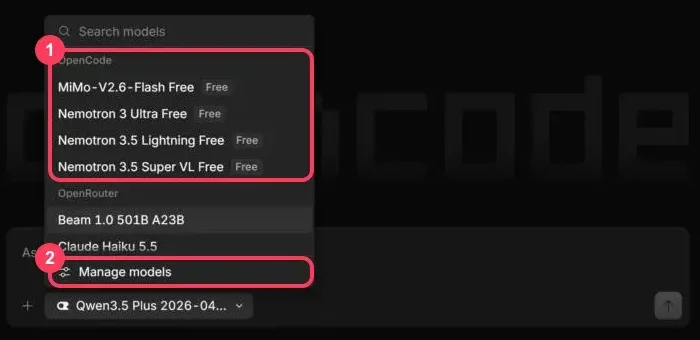
Open OpenCode and click the model name under the message box. The list starts with the OpenCode group: models marked Free (box 1). Click one, type a question and press Enter. Manage models (box 2) shows the full list.
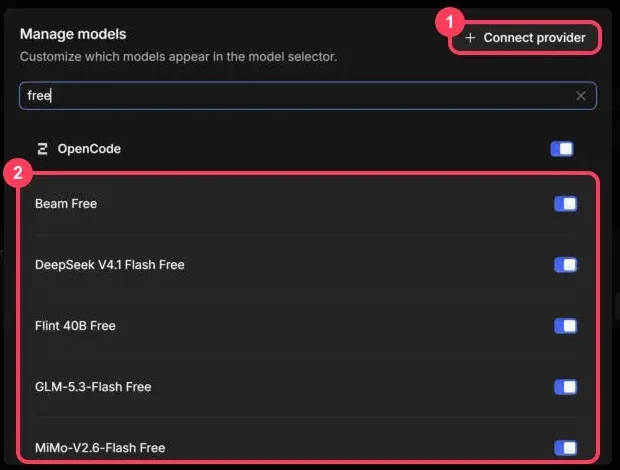
In Manage models, type free in the search box to see them all. In October 2026 the OpenCode
group has eight: Beam Free, DeepSeek V4.1 Flash Free, Flint 40B Free, GLM-5.3-Flash Free,
MiMo-V2.6-Flash Free, Nemotron 3 Ultra Free, Nemotron 3.5 Lightning Free and Nemotron 3.5 Super VL
Free (box 2). Each switch controls whether a model appears in the picker.
Two things to know about these free models:
- They have a usage limit. After heavy use, if you get a free usage error, just change the model and continue - pick a model from a provider you connected with your own free key (Steps 2 to 4).
- Your data is stored when you use them. OpenCode keeps your data only when you use its own free models, so do not send private code or information to them.
Step 2: Open Connect provider
In Manage models, click Connect provider (box 1 in the picture above). The window lists providers, with a search box at the top (box 1 below):
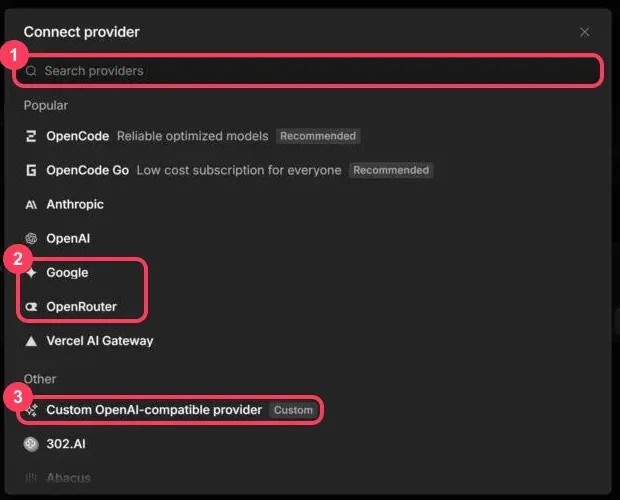
- Gemini: choose Google (box 2).
- OpenRouter: choose OpenRouter (box 2).
- Groq: type
groqin the search box and choose Groq. - Cloudflare Workers AI: type
cloudflareand choose Cloudflare Workers AI. - Any other OpenAI-compatible API: choose Custom OpenAI-compatible provider (box 3) and enter its base URL - the list of free APIs has them.
Step 3: Paste your API key
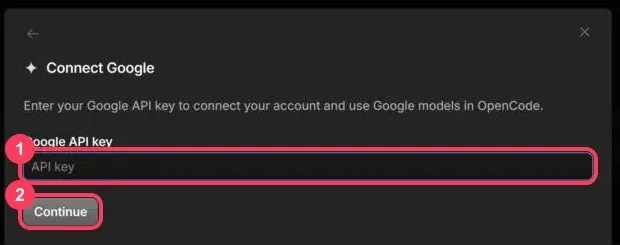
The next window asks for that provider's key. For Gemini it asks for your Google API key. Paste the key into the box (box 1) and click Continue (box 2).
Keep the key private: never paste it into a chat message, a shared file or a screenshot.
The Cloudflare Workers AI window asks only for the API key. Cloudflare's API also needs your account ID; if Cloudflare models do not answer, see OpenCode's provider docs.
Step 4: Pick a free model and send a question
Click the model name under the message box again. The provider you connected now has its own group.
Type in the picker's search box to find a model quickly - for example free for OpenRouter's :free
models, or gemini 3.8 flash for Gemini.
In October 2026, OpenRouter's group in OpenCode lists 14 models marked (free), among them Flint, Gemma 4 26B and 31B, Inkling, Inkling Small, LFM2.5-2.6B, several Nemotron models, North Mini Code and Xing4.0 29B. Pick one, such as Flint (free), type your question and press Enter:
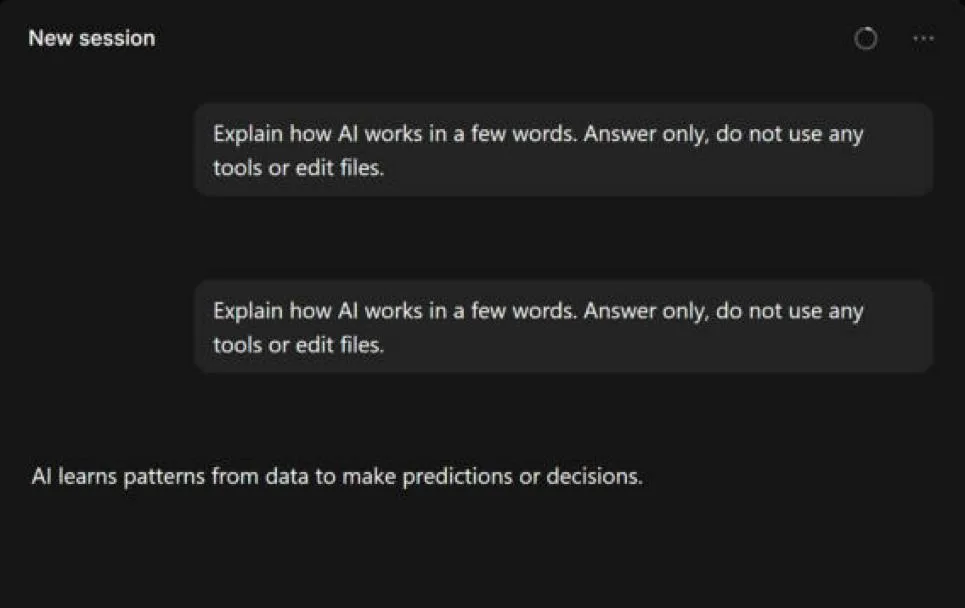
The free limits are the provider's, not OpenCode's - for OpenRouter, 50 free requests a day; for Groq, 1,000 a day on its Free plan models; for Gemini, per model as Google's AI Studio shows.
Free limits by provider
OpenCode is a coding agent: one task can send many requests as it reads files and makes changes, so a daily limit runs out faster than in a chat app. The limits each provider publishes:
| Where the model comes from | Free allowance | Tutorial |
|---|---|---|
| OpenCode's own free models | Not published; heavy use ends in a free usage error | - |
| Groq Free plan | 1,000 requests a day per model | Groq |
OpenRouter :free models | 50 requests a day (1,000 after buying 10 credits) | OpenRouter |
| Gemini API free tier | 20 to 500 requests a day per model | Gemini |
| Cloudflare Workers AI | 10,000 Neurons a day | Cloudflare |
When something goes wrong
| What you see | What it means | What to do |
|---|---|---|
| Free usage exceeded, subscribe to Go | OpenCode's own free models reached their limit | Change the model and continue, using a provider you connected with your own free key |
| No model is available for session | No model is switched on or connected | Open Manage models, connect a provider, then pick a model |
| Model unavailable | The model was removed or the provider is not connected | Pick another model, or connect the provider again |
A 429 error from the provider | Your free key reached that provider's limit | Wait for its reset, or switch to another provider's free model |
Words to know
- Provider: the company whose API runs the model - Google, Groq, OpenRouter, Cloudflare.
- Connect provider: OpenCode's window for adding a provider's API key.
- OpenCode Go: OpenCode's paid subscription ($10 a month) for more usage; not needed for the steps above.
- API key: the password that identifies you to a provider. See how to get AI API keys for free.
Frequently asked questions
Is OpenCode free?+
Yes. OpenCode is free to use; any cost comes from the model provider you connect. It also includes some free models of its own, with a usage limit.
Which free models does OpenCode have?+
In October 2026 OpenCode's own free models are Beam Free, DeepSeek V4.1 Flash Free, Flint 40B Free, GLM-5.3-Flash Free, MiMo-V2.6-Flash Free, Nemotron 3 Ultra Free, Nemotron 3.5 Lightning Free and Nemotron 3.5 Super VL Free. Type "free" in Manage models to see the current list.
How do I add an API key in OpenCode?+
Open the model picker, click Manage models, then Connect provider. Choose the provider (for example Google for Gemini, OpenRouter or Groq), paste the key and click Continue. The provider's models then appear in the model picker.
How do I add a Gemini API key to OpenCode?+
In Connect provider, choose Google, paste the free key you made in Google AI Studio, and click Continue. Then pick a Gemini model with a free tier, such as Gemini 3.8 Flash.
How do I add an OpenRouter API key to OpenCode?+
In Connect provider, choose OpenRouter, paste your OpenRouter key and click Continue. Its free models are the ones marked (free) in the model picker; OpenRouter allows 50 free requests a day.
Why does OpenCode show a free usage exceeded error?+
OpenCode's own free models have a usage limit. After heavy use, if you get this error, just change the model and continue - pick one from a provider you connected with your own free API key, such as Groq or OpenRouter.
More free API key tutorials
- How to get a Gemini API key for free
- How to get a Groq API key for free
- How to get an OpenRouter API key for free
- How to get a Cloudflare Workers AI API key for free
- How to get a Cohere API key for free
- How to get an Experimental Labs API key for free (with the $1 verification)
- Every free AI API and its daily limit