How to Get an OpenRouter API Key for Free and Use Its Free Models
Updated 25 October 2026.
In short: OpenRouter is one API that reaches hundreds of models from many providers. Some of them
are free: every model whose ID ends in :free. A free OpenRouter account can send 50 requests a day
to those models, 20 a minute, without buying anything. In October 2026 there are 17 free text
models, including Google's Gemma 4. OpenRouter's API follows OpenAI's format, so the key works in most
apps made for OpenAI.
What you need
- An account on openrouter.ai (click Sign in at the top right).
- A computer. Windows, Mac or Linux all work.
- Nothing to pay for 50 free requests a day. OpenRouter's limits page raises that to 1,000 a day once an account has bought at least 10 credits in total.
Step 1: Find the free models
Open Models at the top of openrouter.ai. In the left column, drag Prompt pricing to FREE (box 1). Every model left in the list has (free) in its name (box 2) and costs $0 per million tokens.
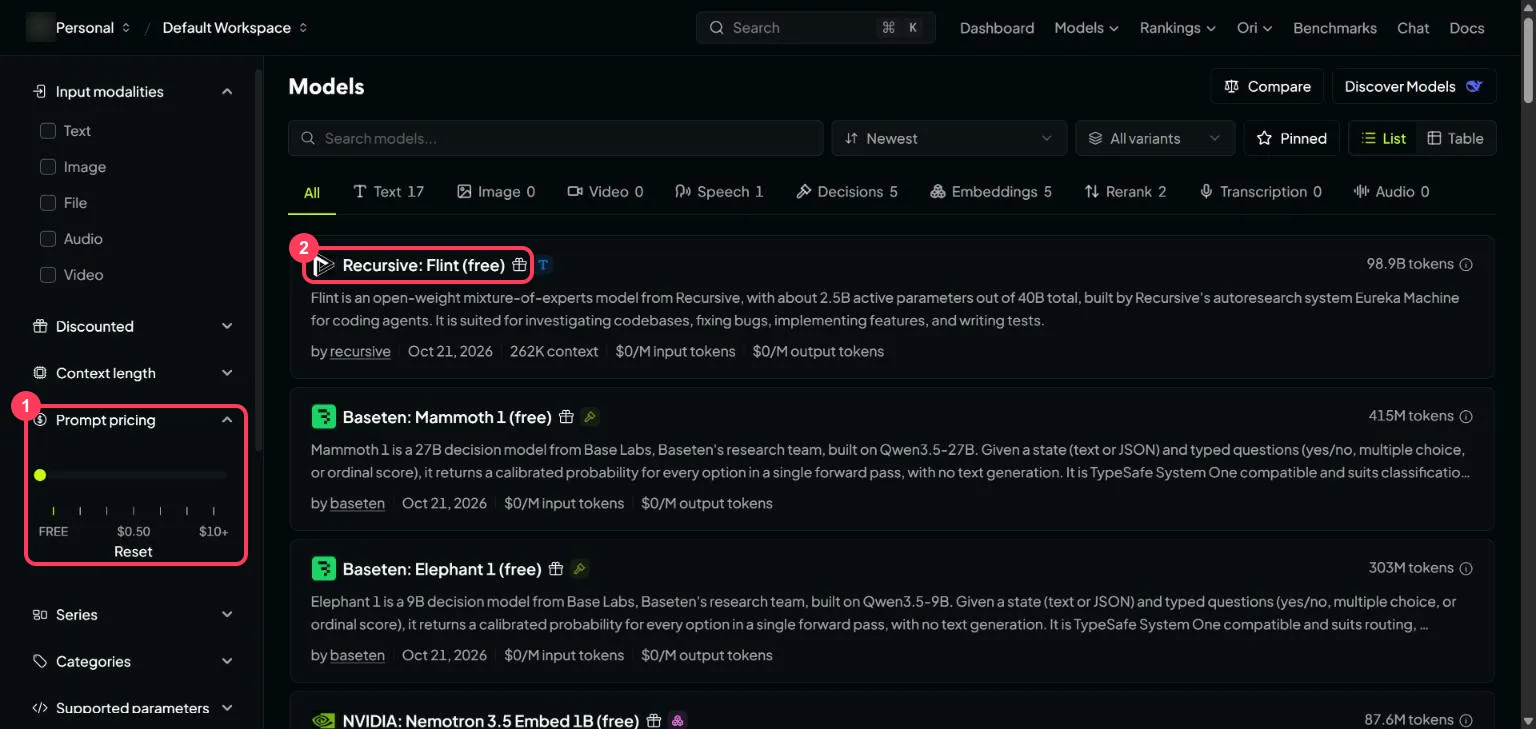
Click a model to see its ID - the name you send in a request, such as google/gemma-4-31b-it:free.
The :free at the end is what makes the request free; the same model without it is the paid version.
Step 2: Open the API Keys page
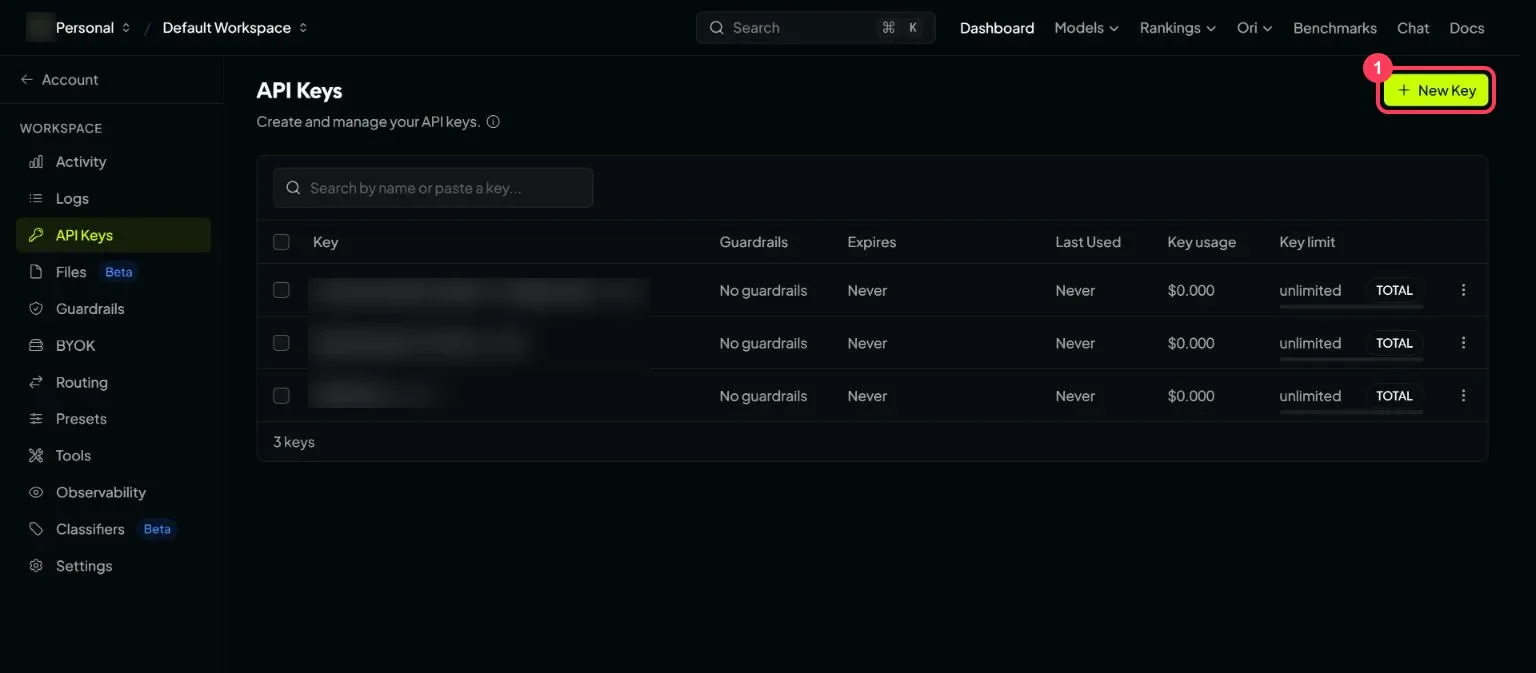
An API key is a password that lets a program use your account. Open openrouter.ai/settings/keys - it opens API Keys in your workspace settings - and click New Key (box 1).
Step 3: Create your free API key
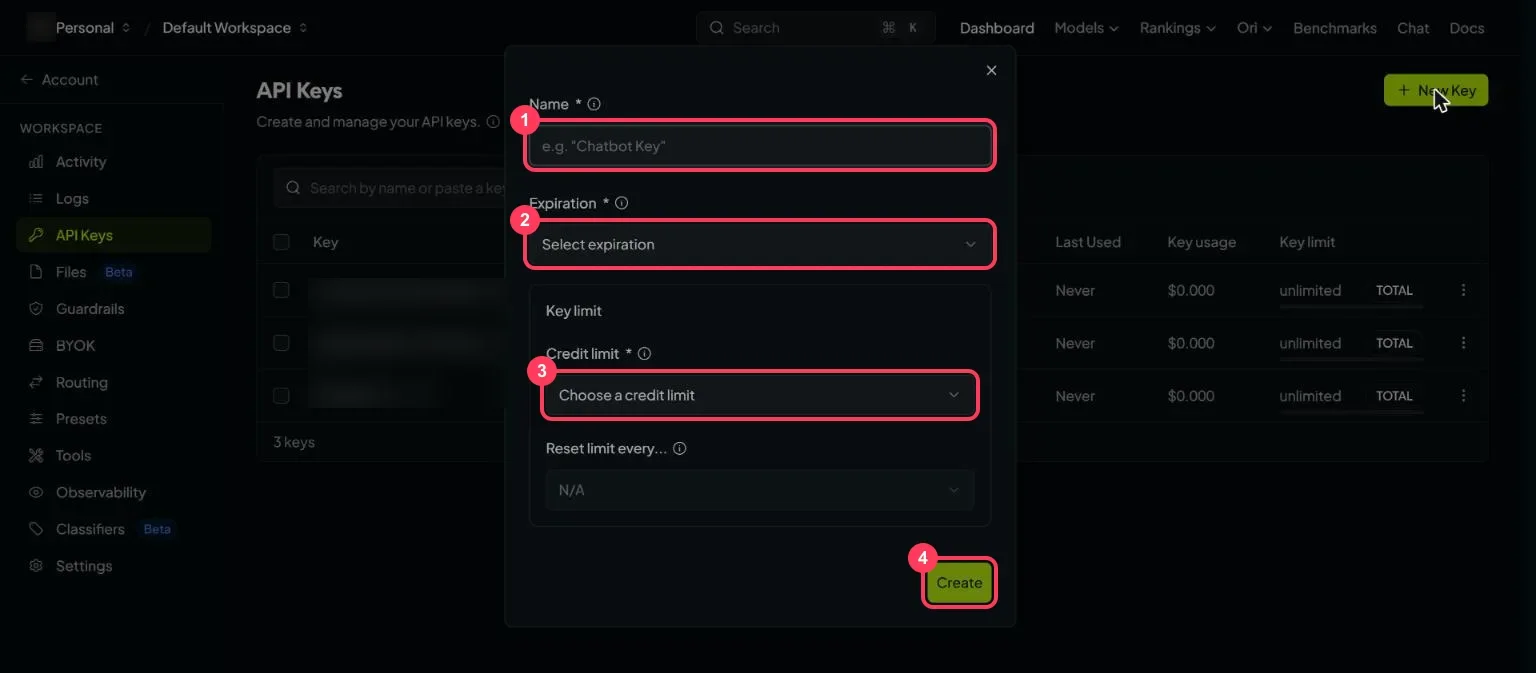
Fill in the window:
- Name - anything you will recognise, such as "my laptop".
- Expiration - when the key stops working.
- Credit limit - the most this key may spend. For free models only, the smallest limit is the safest: free requests cost nothing, and a limit stops the key spending credits by accident if you ever add some.
- Click Create, then copy the key.
Keep the key private:
- Anyone who has your key can use your account.
- Never paste it into a website, a public code repository or a screenshot.
- If it leaks, delete it on the API Keys page (the menu at the end of its row) and create a new one.
Step 4: Allow the free providers (privacy settings)
Free models are served by providers with their own data policies, and OpenRouter only sends your request to providers your settings allow. Open openrouter.ai/settings/privacy and scroll to Data Training:
- Allow free endpoints that train on request data - providers serving free models that may keep your prompts and replies or train on them.
- Allow free endpoints that publish prompts - providers that may publish prompts and replies to public datasets.
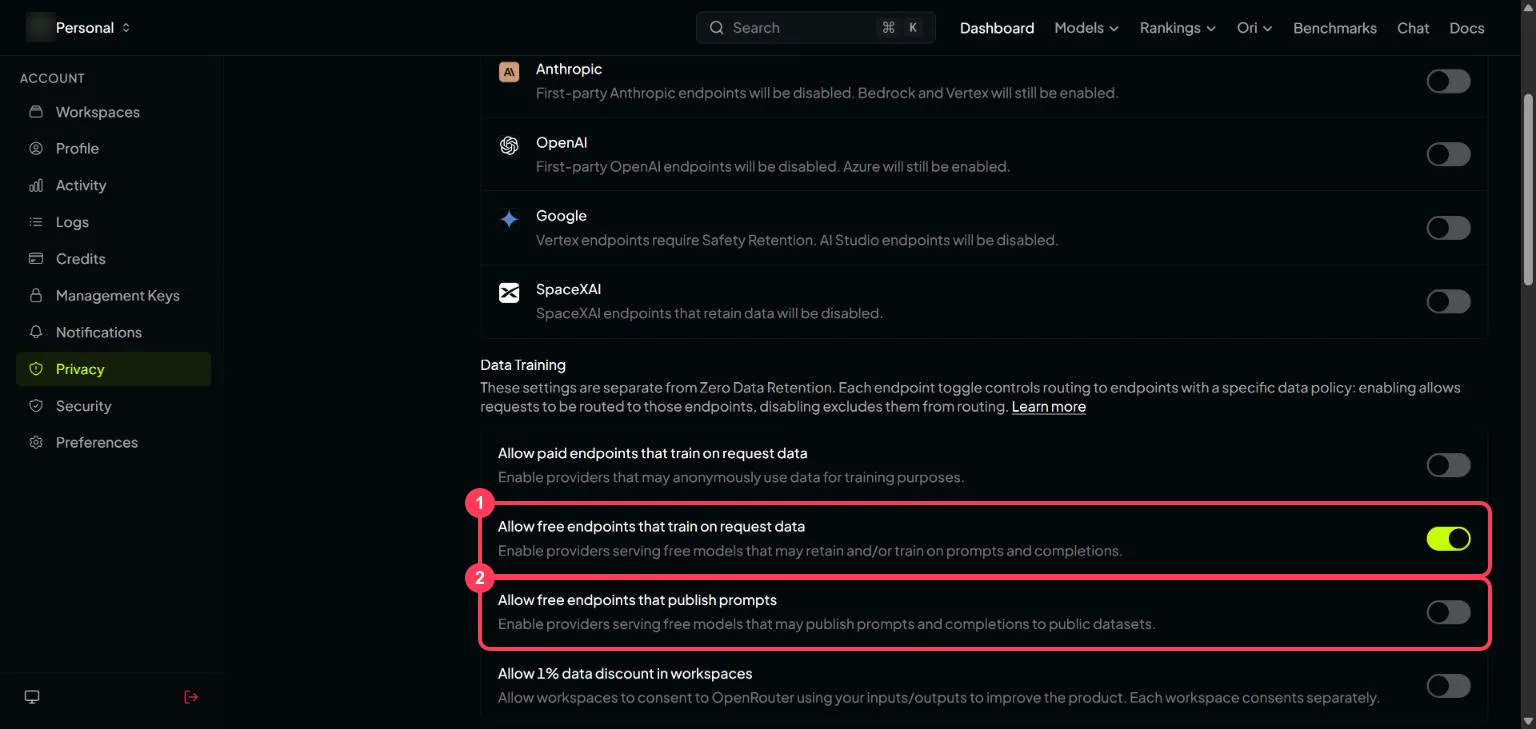
With a switch off, OpenRouter excludes those providers from routing, so a free model served only by them will not answer. With it on, assume anything you send can be kept, used for training or, for the second switch, made public. Do not send private or confidential information to free models.
Step 5: Check your free limits
The free limits are set by how many credits your account has ever bought, not by the model:
| Credits bought (all time) | Requests per minute | Requests per day |
|---|---|---|
| Less than 10 | 20 | 50 |
| At least 10 | 20 | 1,000 |
Three more rules from OpenRouter's limits page:
- More accounts or API keys do not raise your limits.
- The daily count runs on the UTC day.
- If your balance goes below zero, even free models return a
402error until you add credits.
To see how many free requests you have left today, open this address with your key (Step 6 shows how
to send it): https://openrouter.ai/api/v1/key. The free_model_daily_requests part of the answer
shows used, limit and remaining - for a new account, {"used":0,"limit":50,"remaining":50}.
Step 6: Send your first request (no programming)
Open a command window. On Windows, press the Start key, type PowerShell and open it. On a Mac, open Terminal.
Windows (PowerShell) - paste these lines, putting your key in place of YOUR_API_KEY:
$env:OPENROUTER_API_KEY = "YOUR_API_KEY"
$body = '{"model":"poolside/laguna-s-2.1:free","messages":[{"role":"user","content":"Explain how AI works in a few words"}]}'
$r = Invoke-RestMethod -Method Post -Uri "https://openrouter.ai/api/v1/chat/completions" -Headers @{ Authorization = "Bearer $env:OPENROUTER_API_KEY" } -ContentType "application/json" -Body $body
$r.choices[0].message.content
Mac or Linux (Terminal):
export OPENROUTER_API_KEY="YOUR_API_KEY"
curl https://openrouter.ai/api/v1/chat/completions \
  -H "Authorization: Bearer $OPENROUTER_API_KEY" \
  -H "Content-Type: application/json" \
  -d '{
    "model": "poolside/laguna-s-2.1:free",
    "messages": [{"role": "user", "content": "Explain how AI works in a few words"}]
  }'
You get a short answer back. That is one request from your 50 for the day.
Free models fail now and then: a busy provider returns 429, and a provider that is down returns
404 with Provider returned error. If a free model fails, just change the model name and try again.
Or let OpenRouter choose: use the model ID openrouter/free instead of a model name. OpenRouter then
picks an available free model for each request, so a busy or broken model is skipped for you. Each
request still counts toward your 50 a day.
Step 7: Use it in an app made for OpenAI
In any app that asks for an OpenAI key, change three settings:
| Setting the app asks for | What to enter |
|---|---|
| API key | your OpenRouter API key |
| Base URL (sometimes called API endpoint) | https://openrouter.ai/api/v1 |
| Model | openrouter/free (any free model), or a model ID ending in :free, e.g. poolside/laguna-s-2.1:free |
Python's openai library works the same way:
import os
from openai import OpenAI

client = OpenAI(base_url="https://openrouter.ai/api/v1", api_key=os.environ["OPENROUTER_API_KEY"])
reply = client.chat.completions.create(
    model="poolside/laguna-s-2.1:free",
    messages=[{"role": "user", "content": "Explain how AI works in a few words"}],
)
print(reply.choices[0].message.content)
The free models list
These are the 17 free text-output models in OpenRouter's public model list in October 2026. The list changes often; the models page always shows the current one.
| Model ID | Context window (tokens) | Reads |
|---|---|---|
recursive/flint-v1.0:free | 262,144 | text |
xingchen-agi/xing4.0-29b-a4b:free | 262,144 | text |
nvidia/nemotron-3.5-super-vl:free | 1,000,000 | text, images, video |
dots-studio/dots-3-note-preview:free | 512,000 | text, images |
liquid/lfm-2.5-2.6b:free | 65,536 | text |
nvidia/nemotron-3.5-lightning:free | 1,000,000 | text |
thinkingmachines/inkling-small:free | 1,048,576 | text, images, audio |
poolside/laguna-s-2.1:free | 262,144 | text |
thinkingmachines/inkling:free | 1,048,576 | text, images, audio |
poolside/laguna-xs-2.1:free | 262,144 | text |
cohere/north-mini-code:free | 256,000 | text |
nvidia/nemotron-3.5-content-safety:free | 128,000 | text, images |
nvidia/nemotron-3-ultra-550b-a55b:free | 1,000,000 | text |
nvidia/nemotron-3-nano-omni-30b-a3b-reasoning:free | 256,000 | text, images, audio, video |
google/gemma-4-26b-a4b-it:free | 262,144 | text, images, video |
google/gemma-4-31b-it:free | 262,144 | text, images, video |
nvidia/nemotron-3-super-120b-a12b:free | 262,144 | text |
When something goes wrong
| What you see | What it means | What to do |
|---|---|---|
429 Rate limit exceeded | Either you reached 20 a minute or your daily limit, or the provider serving the model is busy | Check free_model_daily_requests (Step 5). If you have requests left, wait a little or use another free model |
404 Provider returned error | The provider behind that free model failed | Use another model ID from the list |
| A free model never answers | Your privacy settings exclude the only providers serving it | See Step 4, or pick another model |
402 | Your balance is below zero | Add credits to bring it above zero; free models work again |
401 | The key is wrong or deleted | Copy it again, or create a new one |
Words to know
- API key: the password that identifies you to the API and counts your usage. See what is an API key.
:freemodel: a free variant of a model on OpenRouter, with the limits above.- Credits: OpenRouter's prepaid balance, used by paid models.
- Provider: the company whose servers run the model; OpenRouter passes your request to one.
- Token: a piece of a word; the unit models read and write. See tokens and context windows.
More free AI API keys
OpenRouter is one of the providers with a free tier. How to get AI API keys for free lists each one with its daily limit and source. For higher daily limits on one provider's models, see how to get a Groq API key for free (1,000 requests a day) and how to get a Gemini API key for free.
Frequently asked questions
Is OpenRouter free?+
Its :free models are. A free account can send 50 requests a day and 20 a minute to models whose ID ends in :free. Other models are paid with credits.
Are OpenRouter free models unlimited?+
No. Free models are limited to 20 requests a minute and 50 a day, or 1,000 a day once an account has bought at least 10 credits in total.
Which models are free on OpenRouter?+
Every model whose ID ends in :free. In October 2026 there are 17 free text models, including Google's Gemma 4 31B and 26B and several NVIDIA Nemotron models. The models page filtered to free shows the current list.
Do more API keys or accounts give more free requests?+
No. More accounts or API keys do not raise your free limits.
Why does a free model on OpenRouter return an error?+
A 429 can mean the provider serving it is busy even when you have requests left; a 404 Provider returned error means that provider failed. Just change the model and try again. If a free model never answers, your privacy settings may exclude the providers that serve it.
Do OpenRouter free models use my data?+
They can. Some providers serving free models may keep your prompts and replies, train on them, or publish them to public datasets. Do not send private information to free models.
More free API key tutorials
- How to get a Gemini API key for free
- How to get a Groq API key for free
- How to get a Cloudflare Workers AI API key for free
- How to get a Cohere API key for free
- How to get an Experimental Labs API key for free (with the $1 verification)
- Every free AI API and its daily limit
Want to use these APIs in a desktop app? OpenCode is a free, open-source AI coding app for Windows, Mac and Linux. How to add free API keys to OpenCode and pick a model.