How to Get a Cloudflare Workers AI API Key for Free
Updated 25 October 2026.
In short: Cloudflare's Workers AI is included in the Workers Free plan. Every account can use 10,000 Neurons a day at no charge - Neurons are Cloudflare's unit of AI compute - on most of its text models, including gpt-oss-20b, gpt-oss-120b, Gemma 4 26B and Llama 3.3 70B. You need two things from the dashboard: an API token and your account ID. Workers AI also has an OpenAI-compatible endpoint, so the token works in apps made for OpenAI.
What you need
- A Cloudflare account (dash.cloudflare.com).
- A computer. Windows, Mac or Linux all work.
- Nothing to pay for 10,000 Neurons a day: anyone can use that much at no charge, as Cloudflare's pricing page lists. All limits reset at 00:00 UTC.
Step 1: Open Workers AI
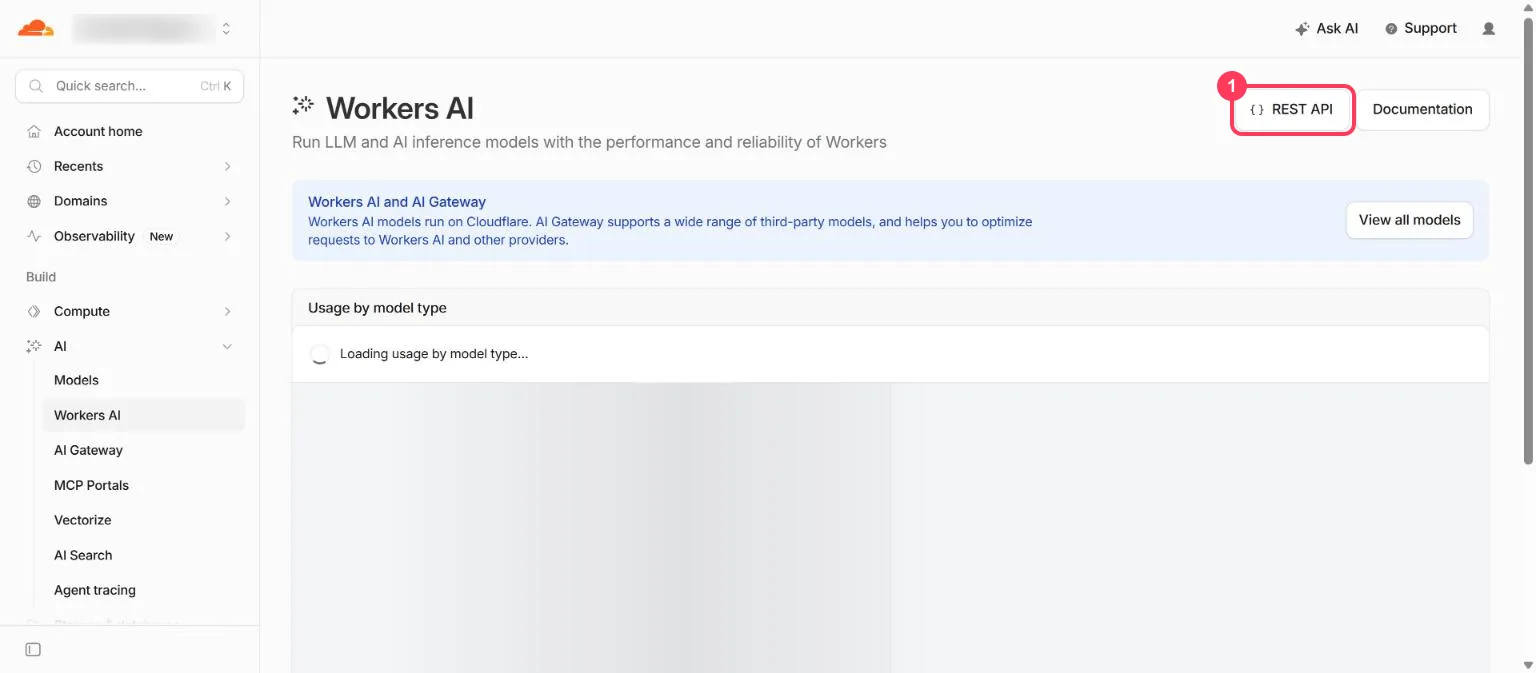
Sign in to the Cloudflare dashboard. In the left menu, open AI > Workers AI, then click REST API at the top right (box 1).
Step 2: Create a token and copy your account ID
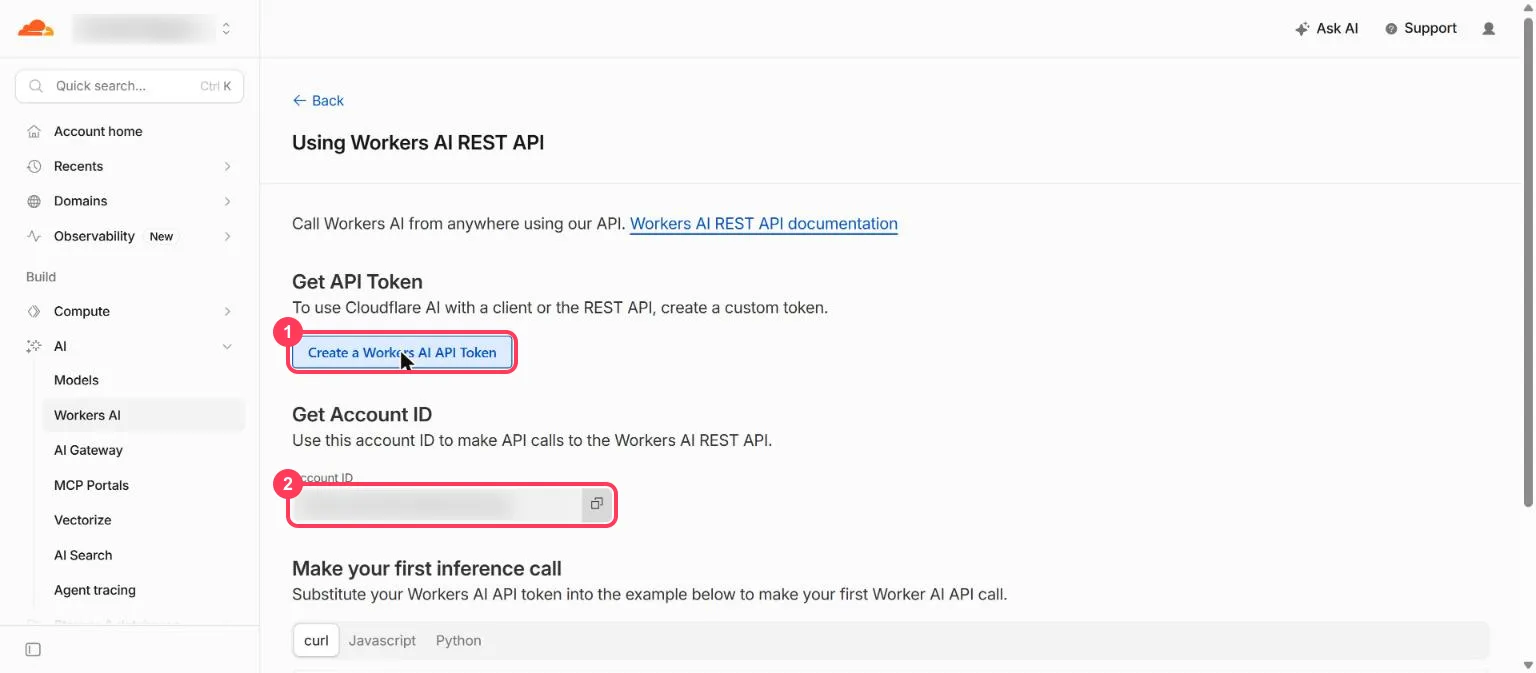
The Using Workers AI REST API page has both things you need:
- Create a Workers AI API Token - opens a token form with the Workers AI permissions already filled in. Create it and copy the token: Cloudflare shows it only once.
- Account ID - the long code under Get Account ID. Click the copy button next to it.
The token is a password; the account ID is not, but it goes in every request. Keep the token private:
- Anyone who has your token can use your allowance.
- Never paste it into a website, a public code repository or a screenshot.
Step 3: Check your token
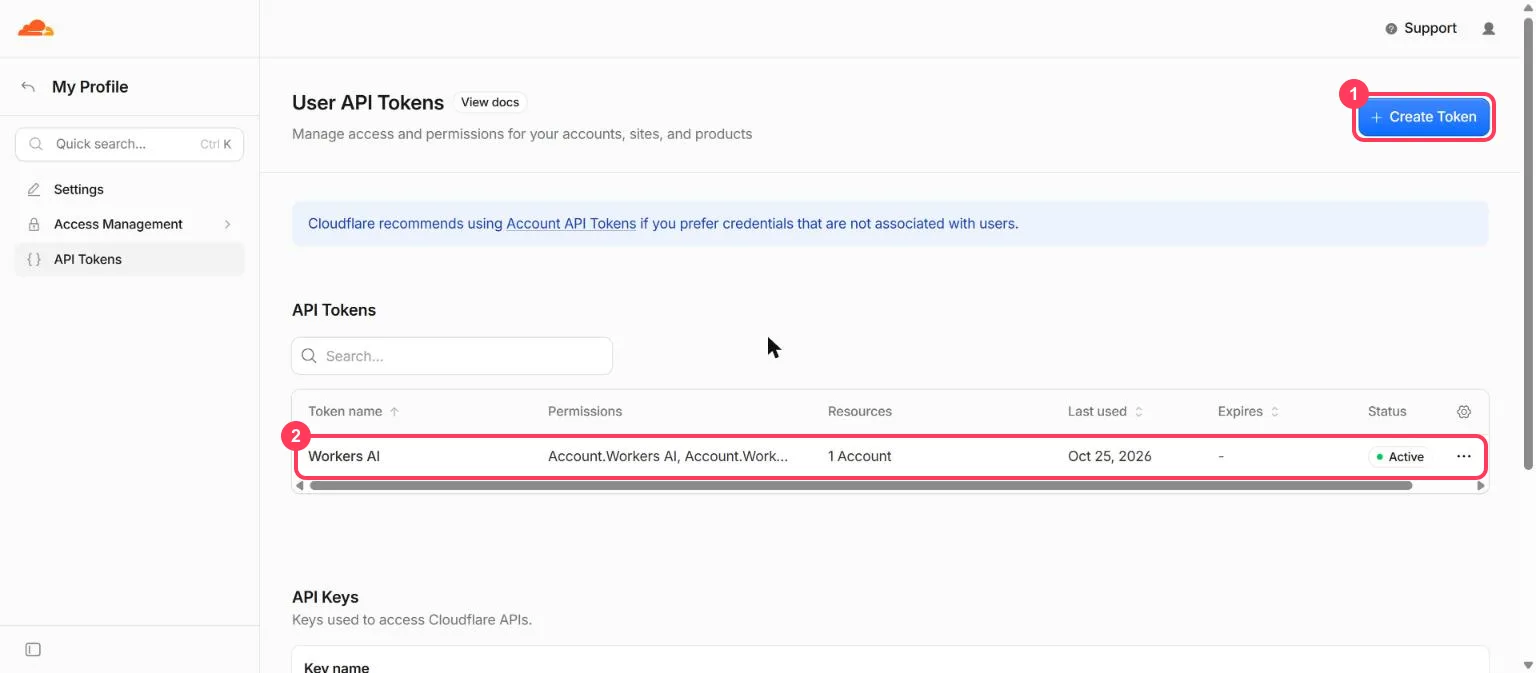
Your tokens are listed under My Profile > API Tokens (open the profile icon at the top right). Each row shows the token's name, permissions and status (box 2). If a token leaks, use the menu at the end of its row to delete it, then create a new one with Create Token (box 1).
Step 4: Know which models are free
Some Workers AI models need the paid plan. If you pick one on the free plan, the request fails with a not available on the Workers Free plan error. In October 2026 these text models need Workers Paid: Kimi K2.7 Code and K2.6, GLM-5.3, GLM-5.3 Flash and GLM-5.2, and DeepSeek V4 Flash, V4 Pro and V4.1 Flash.
These general text models work on the free plan:
| Model ID | Context window (tokens) | Listed price, $ per million tokens (in / out) |
|---|---|---|
@cf/openai/gpt-oss-20b | 128,000 | 0.20 / 0.30 |
@cf/openai/gpt-oss-120b | 128,000 | 0.35 / 0.75 |
@cf/google/gemma-4-26b-a4b-it | 256,000 | 0.10 / 0.30 |
@cf/qwen/qwen3.8-27b | 262,144 | 0.45 / 3.20 |
@cf/meta/llama-3.3-70b-instruct-fp8-fast | 24,000 | 0.293 / 2.253 |
@cf/meta/llama-4-scout-17b-16e-instruct | 131,000 | 0.27 / 0.85 |
@cf/mistralai/mistral-small-3.1-24b-instruct | 128,000 | 0.351 / 0.555 |
@cf/nvidia/nemotron-3-120b-a12b | 256,000 | 0.50 / 1.50 |
@cf/zai-org/glm-4.7-flash | 131,072 | 0.0605 / 0.40 |
@cf/qwen/qwen3-30b-a3b-fp8 | 32,768 | 0.0509 / 0.335 |
@cf/meta/llama-3.1-8b-instruct-fp8 | 32,000 | 0.152 / 0.287 |
Step 5: Work out what 10,000 Neurons buys
Cloudflare bills Workers AI at $0.011 per 1,000 Neurons, so the free 10,000 Neurons a day are worth $0.11 a day at the prices above. Every request is counted against that.
For example, with @cf/openai/gpt-oss-20b, a request with 1,000 tokens in and 500 tokens out costs $0.0002 + $0.00015 = $0.00035, so $0.11 covers about 300 such requests a day.
Longer prompts, longer answers or a pricier model mean fewer. Above 10,000 Neurons, requests fail on
the free plan; the Workers Paid plan bills the extra.
Step 6: Send your first request (no programming)
Open a command window. On Windows, press the Start key, type PowerShell and open it. On a Mac,
open Terminal. Put your token in place of YOUR_API_TOKEN and your account ID in place of
YOUR_ACCOUNT_ID.
Windows (PowerShell):
$env:CLOUDFLARE_API_TOKEN = "YOUR_API_TOKEN"
$env:CLOUDFLARE_ACCOUNT_ID = "YOUR_ACCOUNT_ID"
$body = '{"messages":[{"role":"user","content":"Explain how AI works in a few words"}]}'
$r = Invoke-RestMethod -Method Post -Uri "https://api.cloudflare.com/client/v4/accounts/$env:CLOUDFLARE_ACCOUNT_ID/ai/run/@cf/meta/llama-3.3-70b-instruct-fp8-fast" -Headers @{ Authorization = "Bearer $env:CLOUDFLARE_API_TOKEN" } -ContentType "application/json" -Body $body
$r.result.response
Mac or Linux (Terminal):
export CLOUDFLARE_API_TOKEN="YOUR_API_TOKEN"
export CLOUDFLARE_ACCOUNT_ID="YOUR_ACCOUNT_ID"
curl "https://api.cloudflare.com/client/v4/accounts/$CLOUDFLARE_ACCOUNT_ID/ai/run/@cf/meta/llama-3.3-70b-instruct-fp8-fast" \
  -H "Authorization: Bearer $CLOUDFLARE_API_TOKEN" \
  -d '{"messages":[{"role":"user","content":"Explain how AI works in a few words"}]}'
You get a short answer back. That is one request from your free daily allowance.
Step 7: Use it in an app made for OpenAI
Most Workers AI text models work with OpenAI's Chat Completions format (Cloudflare's OpenAI compatibility page). The base URL contains your account ID:
| Setting the app asks for | What to enter |
|---|---|
| API key | your Cloudflare API token |
| Base URL (sometimes called API endpoint) | https://api.cloudflare.com/client/v4/accounts/YOUR_ACCOUNT_ID/ai/v1 |
| Model | a model ID from Step 4, e.g. @cf/meta/llama-3.3-70b-instruct-fp8-fast |
When something goes wrong
| What you see | What it means | What to do |
|---|---|---|
403 not available on the Workers Free plan | That model needs the paid plan | Use a model from the table in Step 4 |
| An error after many requests in a day | You used the 10,000 free Neurons | Wait for the reset at 00:00 UTC |
401 or Authentication error | The token is wrong, deleted or lacks Workers AI permission | Create a new one with Create a Workers AI API Token |
404 or No route | The account ID in the address is wrong | Copy it again from the REST API page |
Words to know
- API token: Cloudflare's name for an API key - the password that identifies you. See what is an API key.
- Account ID: the code for your Cloudflare account; it is part of every request address.
- Neuron: Cloudflare's unit for AI compute; the free plan includes 10,000 a day.
- Workers Free / Workers Paid: Cloudflare's free and paid plans for Workers, which include Workers AI.
- Token (in prices): a piece of a word; the unit models read and write. See tokens and context windows.
More free AI API keys
Workers AI is one of the providers with a free tier. How to get AI API keys for free lists each one with its daily limit and source. For a simple daily request count instead of Neurons, see how to get a Groq API key for free.
Frequently asked questions
Is Cloudflare Workers AI free?+
Yes, within 10,000 Neurons a day. Workers AI is included in the Workers Free plan, and anyone can use 10,000 Neurons per day at no charge. Some models need the Workers Paid plan.
What are the Cloudflare Workers AI free tier limits?+
10,000 Neurons a day, resetting at 00:00 UTC. At Cloudflare's rate of $0.011 per 1,000 Neurons that is $0.11 of usage a day; with gpt-oss-20b, about 300 requests of 1,000 tokens in and 500 out.
Which Cloudflare Workers AI models are free?+
Most text models, including gpt-oss-20b, gpt-oss-120b, Gemma 4 26B, Qwen3.8-27B and Llama 3.3 70B. In October 2026 Kimi K2.7 Code and K2.6, GLM-5.3, GLM-5.3 Flash, GLM-5.2 and the DeepSeek V4 models need Workers Paid.
Where is my Cloudflare Workers AI API key?+
Cloudflare calls it an API token. In the dashboard, open AI > Workers AI > REST API and click Create a Workers AI API Token. The same page shows the account ID every request needs.
Can I use Cloudflare Workers AI in an app made for OpenAI?+
Yes. Use your API token as the key, https://api.cloudflare.com/client/v4/accounts/YOUR_ACCOUNT_ID/ai/v1 as the base URL, and a Workers AI model ID such as @cf/meta/llama-3.3-70b-instruct-fp8-fast.
More free API key tutorials
- How to get a Gemini API key for free
- How to get a Groq API key for free
- How to get an OpenRouter API key for free
- How to get a Cohere API key for free
- How to get an Experimental Labs API key for free (with the $1 verification)
- Every free AI API and its daily limit
Want to use these APIs in a desktop app? OpenCode is a free, open-source AI coding app for Windows, Mac and Linux. How to add free API keys to OpenCode and pick a model.