How to Get a Cohere API Key for Free
Updated 25 October 2026.
In short: Cohere gives every new account a free trial API key. It is ready as soon as you sign up: open API Keys in the Cohere dashboard and copy the key named default. A trial key allows 1,000 API calls a month and 20 chat requests a minute, on every Command model. Cohere also has an OpenAI-compatible endpoint, so the key works in most apps made for OpenAI.
What you need
- A Cohere account at dashboard.cohere.com. New accounts start as a Cohere Free Account.
- A computer. Windows, Mac or Linux all work.
- Nothing to pay: calls made with trial keys are free of charge.
One rule to know before you start: trial keys cannot be used for commercial purposes. They are for learning, testing and personal projects. A paid production key needs an application form on the same page.
Step 1: Open the API Keys page
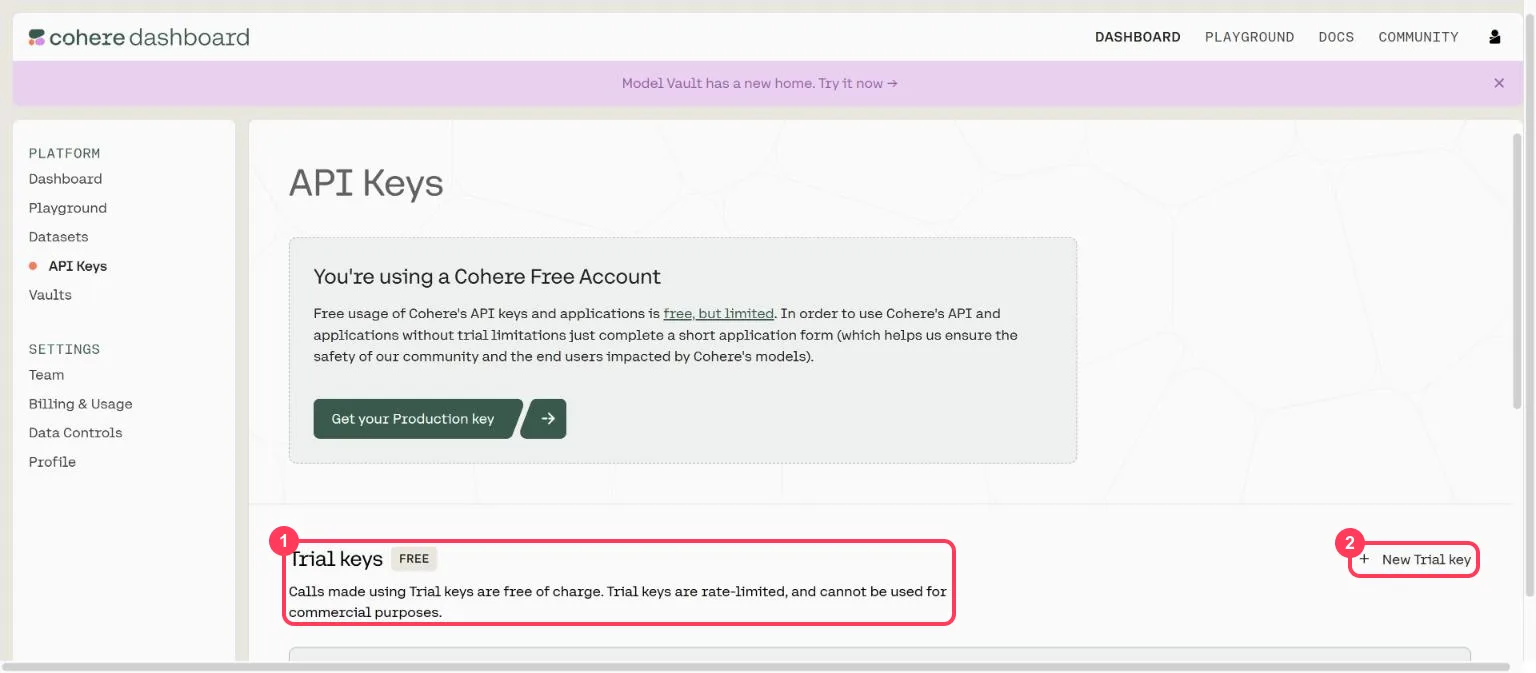
Sign in and click API Keys in the left menu. The top of the page shows that you are on a Cohere Free Account. Scroll down to Trial keys (box 1). New Trial key (box 2) makes another one.
Step 2: Copy your trial key
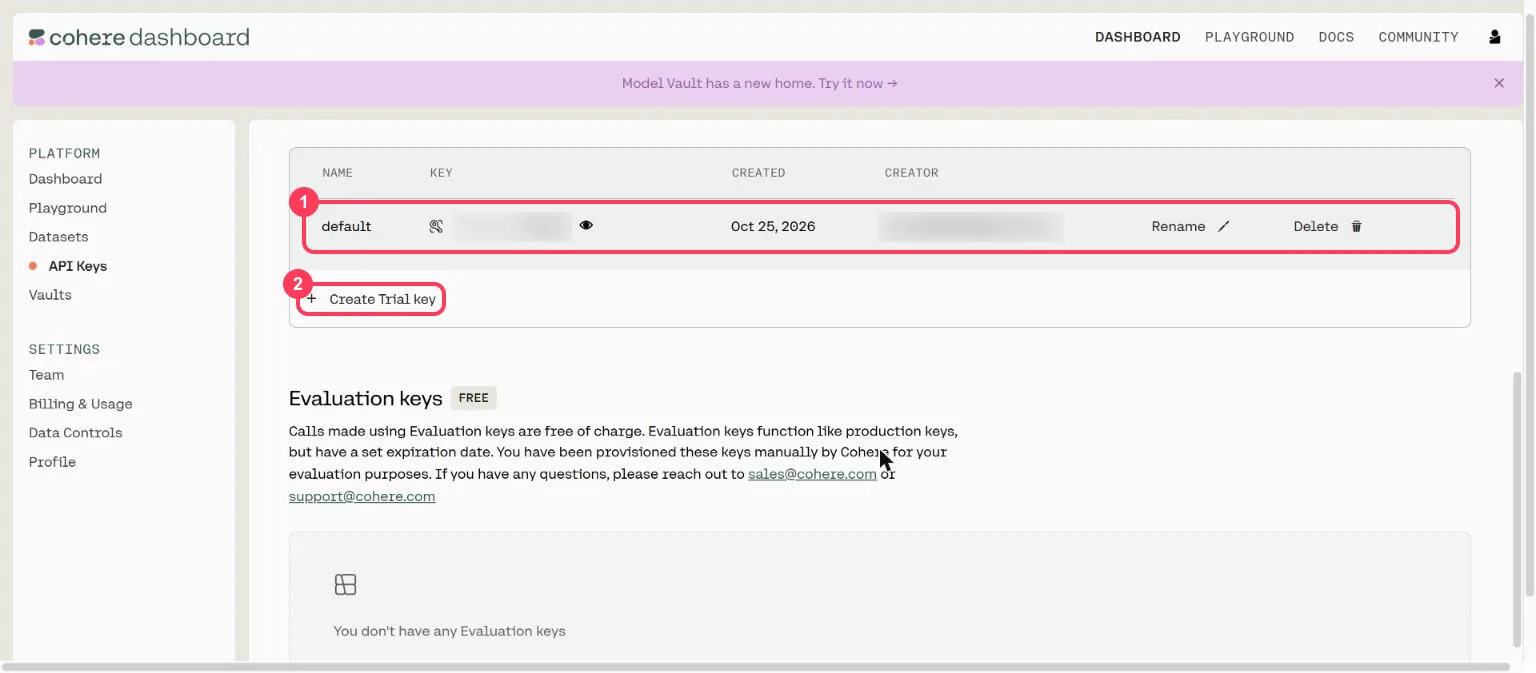
Cohere creates a trial key called default for every new account (box 1). Click the eye icon to show it and the copy icon to copy it. To make a separate key for each app, click Create Trial key (box 2) and give it a name.
Keep the key private:
- Anyone who has your key can use your monthly calls.
- Never paste it into a website, a public code repository or a screenshot.
- If it leaks, click Delete next to it and create a new one.
Step 3: Try the models without any code
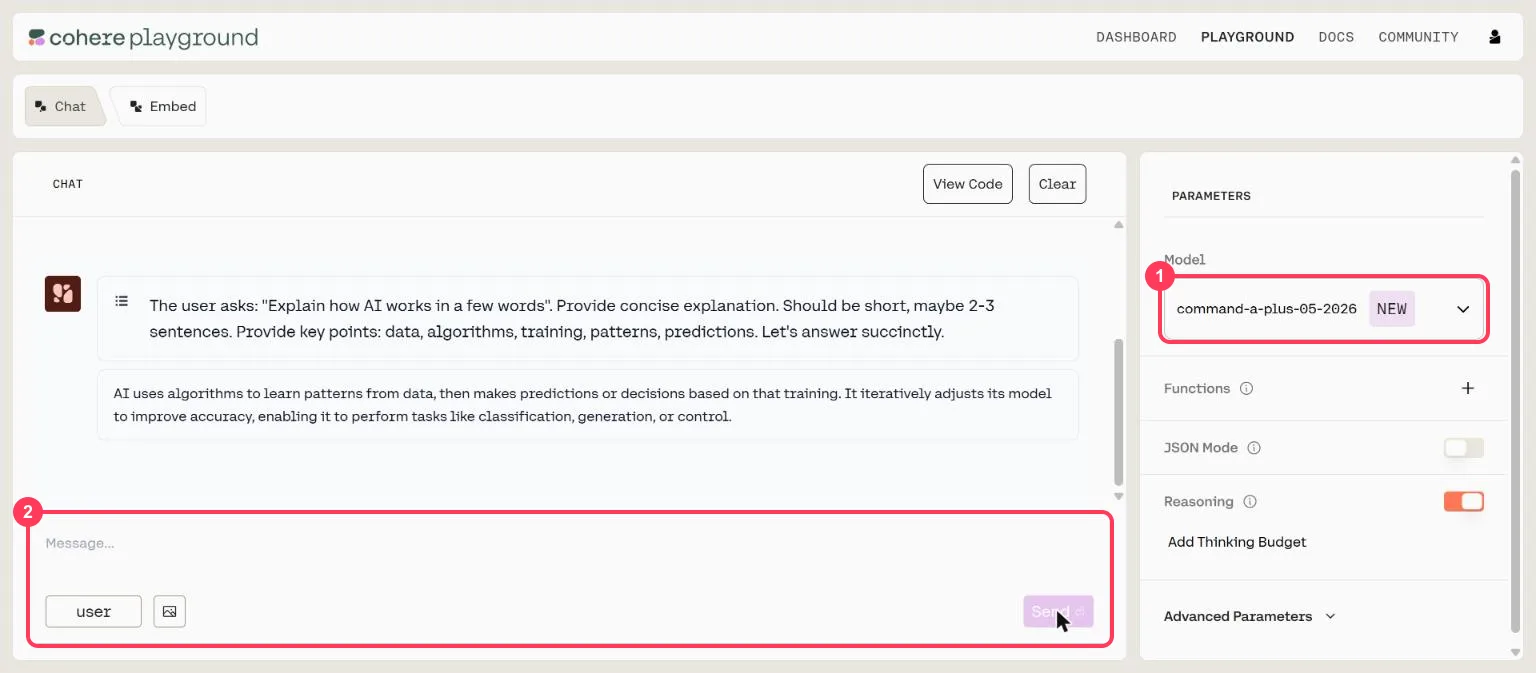
Click Playground at the top. Pick a model in the Model list on the right (box 1), type a question in the message box (box 2) and click Send. View Code shows the same request as code.
Step 4: Know your free limits
| What | Trial key limit |
|---|---|
| All API calls | 1,000 a month |
| Chat models (Command A, A+, A Reasoning, A Vision, A Translate, Command R, R+, R7B, North Mini Code) | 20 requests a minute each |
| Embed | 2,000 inputs a minute |
| Rerank | 10 requests a minute |
| Audio transcriptions | 5 requests a minute |
The monthly 1,000 counts every kind of call together. The full table is on Cohere's rate-limits page.
Step 5: Send your first request (no programming)
Open a command window. On Windows, press the Start key, type PowerShell and open it. On a Mac,
open Terminal. Put your key in place of YOUR_API_KEY.
Windows (PowerShell):
$env:COHERE_API_KEY = "YOUR_API_KEY"
$body = '{"model":"command-a-plus-05-2026","messages":[{"role":"user","content":"Explain how AI works in a few words"}]}'
$r = Invoke-RestMethod -Method Post -Uri "https://api.cohere.ai/compatibility/v1/chat/completions" -Headers @{ Authorization = "Bearer $env:COHERE_API_KEY" } -ContentType "application/json" -Body $body
$r.choices[0].message.content
Mac or Linux (Terminal):
export COHERE_API_KEY="YOUR_API_KEY"
curl https://api.cohere.ai/compatibility/v1/chat/completions \
  -H "Authorization: Bearer $COHERE_API_KEY" \
  -H "Content-Type: application/json" \
  -d '{
    "model": "command-a-plus-05-2026",
    "messages": [{"role": "user", "content": "Explain how AI works in a few words"}]
  }'
You get a short answer back. That is one call from your 1,000 for the month.
Step 6: Use it from Python
Cohere's compatibility API works with OpenAI's Python library:
pip install openai
import os
from openai import OpenAI

client = OpenAI(base_url="https://api.cohere.ai/compatibility/v1", api_key=os.environ["COHERE_API_KEY"])
reply = client.chat.completions.create(
    model="command-a-plus-05-2026",
    messages=[{"role": "user", "content": "Explain how AI works in a few words"}],
)
print(reply.choices[0].message.content)
Step 7: Use it in an app made for OpenAI
In any app that asks for an OpenAI key, change three settings:
| Setting the app asks for | What to enter |
|---|---|
| API key | your Cohere trial key |
| Base URL (sometimes called API endpoint) | https://api.cohere.ai/compatibility/v1 |
| Model | command-a-plus-05-2026 (or another Command model from the Playground list) |
When something goes wrong
| What you see | What it means | What to do |
|---|---|---|
429 too many requests | You sent more than 20 chat requests in a minute, or used your 1,000 calls for the month | Wait a minute; for the monthly limit, wait for the next month |
401 invalid API token | The key is wrong or deleted | Copy it again from the API Keys page, or create a new trial key |
404 or model not found | The model name is wrong | Copy the exact name from the Playground's Model list |
Words to know
- Trial key: Cohere's free API key, limited to 1,000 calls a month and not for commercial use. See what is an API key.
- Production key: Cohere's paid key, after an application form.
- Command: the name of Cohere's chat models, such as Command A+.
- Embed / Rerank: Cohere's models for search: turning text into numbers, and sorting results.
- Token: a piece of a word; the unit models read and write. See tokens and context windows.
More free AI API keys
Cohere is one of the providers with a free tier. How to get AI API keys for free lists each one with its daily limit and source. For more requests a day, see how to get a Groq API key for free (1,000 a day).
Frequently asked questions
Is the Cohere API free?+
Yes, with a trial key. Every new Cohere account gets free trial keys, limited to 1,000 API calls a month and not for commercial use.
How do I get a Cohere API key?+
Sign up at dashboard.cohere.com and open API Keys. A trial key named default is already there; click the eye icon to show it and the copy icon to copy it.
What is the Cohere trial key limit?+
1,000 API calls a month in total, 20 requests a minute for each chat model, 2,000 inputs a minute for Embed and 10 requests a minute for Rerank.
Can I use a Cohere trial key for a commercial project?+
No. Trial keys cannot be used for commercial purposes. A production key needs an application form and is paid.
Can I use Cohere in an app made for OpenAI?+
Yes. Use https://api.cohere.ai/compatibility/v1 as the base URL, your Cohere key as the API key, and a model such as command-a-plus-05-2026.
More free API key tutorials
- How to get a Gemini API key for free
- How to get a Groq API key for free
- How to get an OpenRouter API key for free
- How to get a Cloudflare Workers AI API key for free
- How to get an Experimental Labs API key for free (with the $1 verification)
- Every free AI API and its daily limit
Want to use these APIs in a desktop app? OpenCode is a free, open-source AI coding app for Windows, Mac and Linux. How to add free API keys to OpenCode and pick a model.