How to Get a Groq API Key for Free
Updated 25 October 2026.
In short: Groq has a Free plan that costs $0. You sign in to the GroqCloud console, create an API key, and can then send up to 1,000 requests a day to models such as gpt-oss-120b, gpt-oss-20b and Qwen3.8-27B. Groq's API follows OpenAI's format, so the same key works in most apps made for OpenAI.
What you need
- An email address or an account to sign in with on console.groq.com.
- A computer. Windows, Mac or Linux all work.
- Nothing to pay: Groq's rate-limits page lists separate limits for the Free plan and the paid Developer plan.
Step 1: Try the models without any code
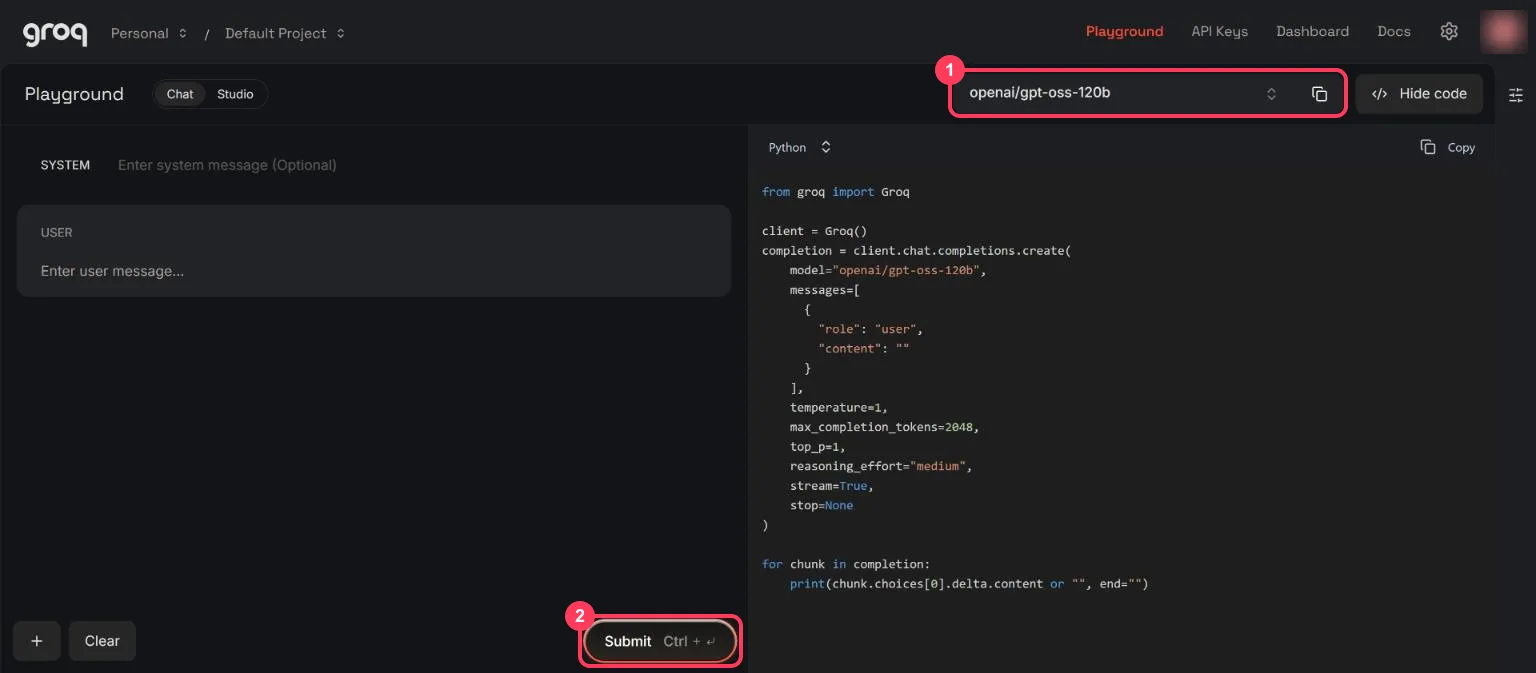
Sign in to the GroqCloud console. Open Playground at the top. Pick a model from the list at the top right (box 1), type a question in the User box, and click Submit (box 2). The right side shows the code for the same request.
Step 2: Open the API Keys page
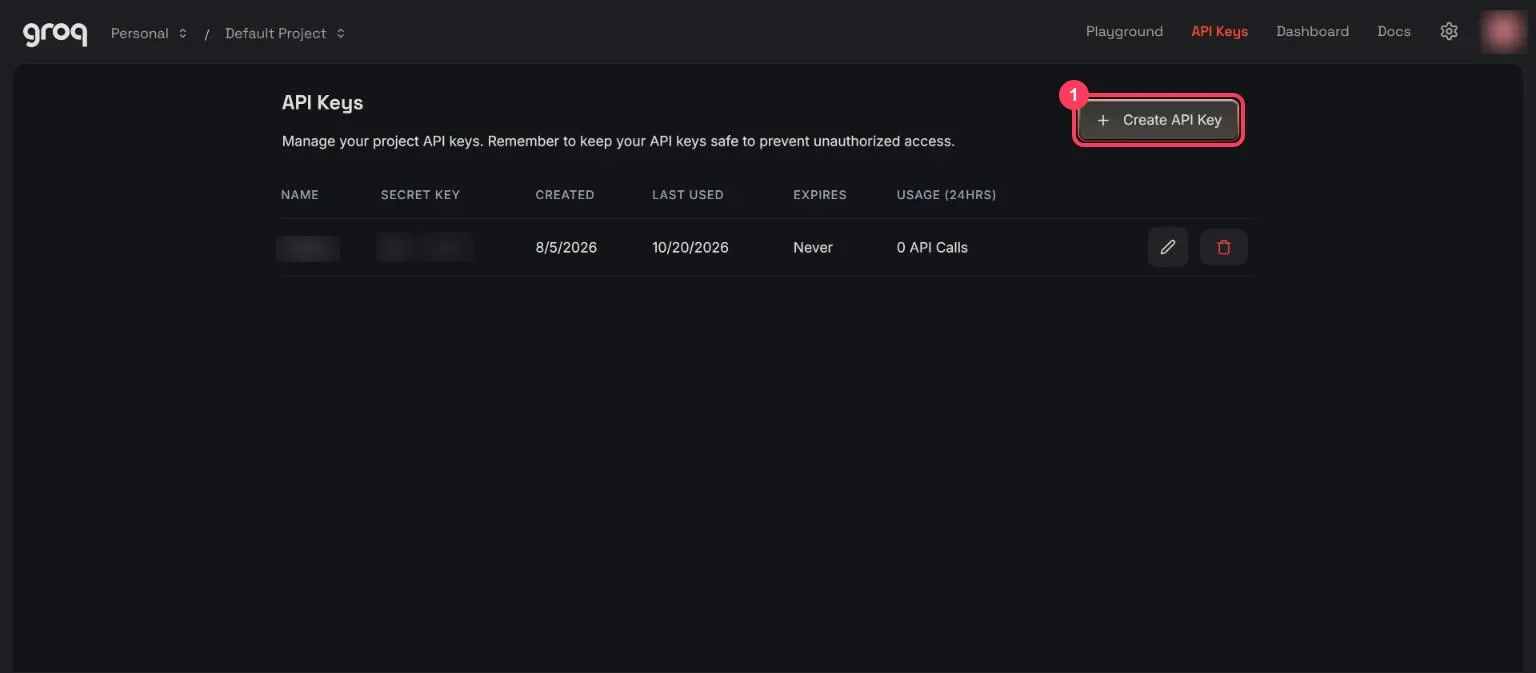
An API key is a password that lets a program use your free allowance. Click API Keys at the top, then Create API Key (box 1).
Step 3: Create your free API key
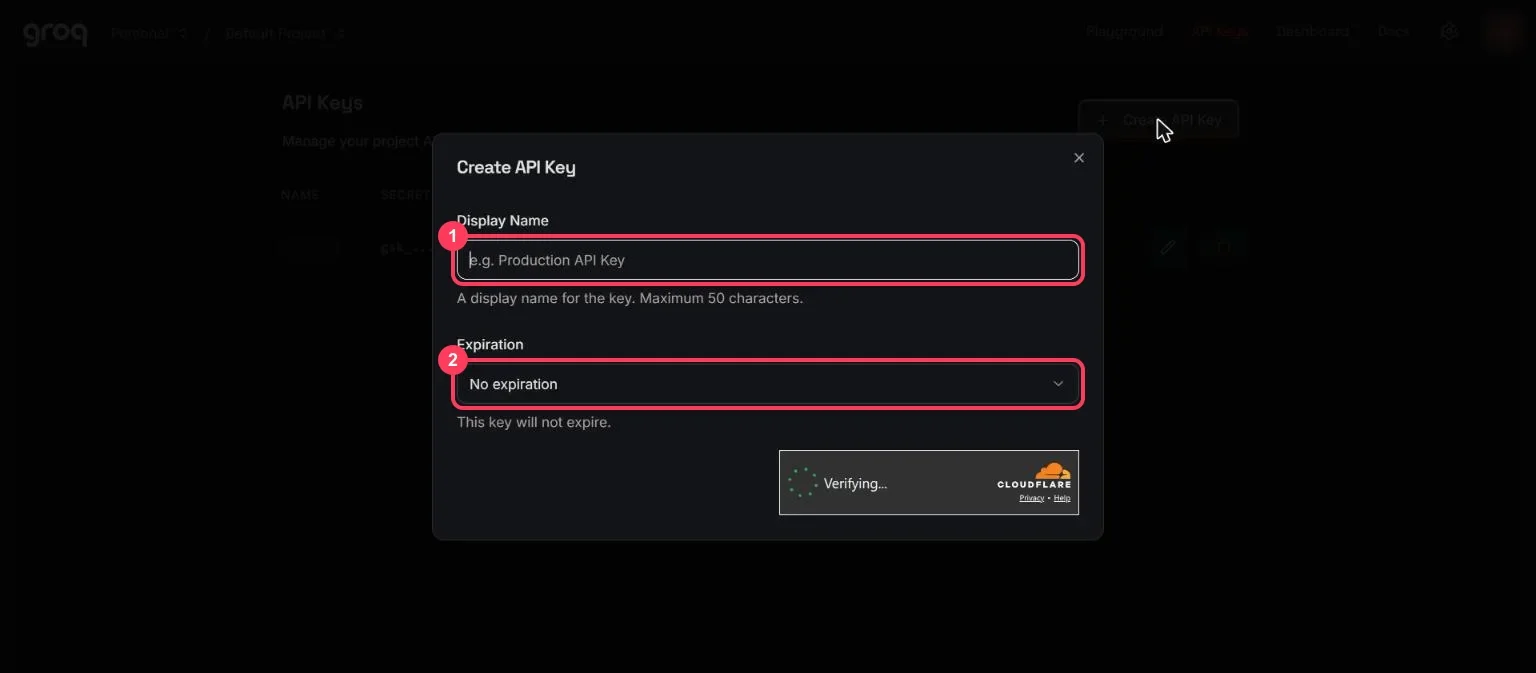
Give the key a name you will recognise (box 1), for example "my laptop", and choose when it expires (box 2). No expiration is the default. A short security check runs at the bottom of the window; then confirm.
Copy the key straight away and keep it private:
- Anyone who has your key can use your allowance.
- Never paste it into a website, a public code repository or a screenshot.
- If it leaks, delete it on the API Keys page (the bin icon) and create a new one.
Step 4: Check your free limits
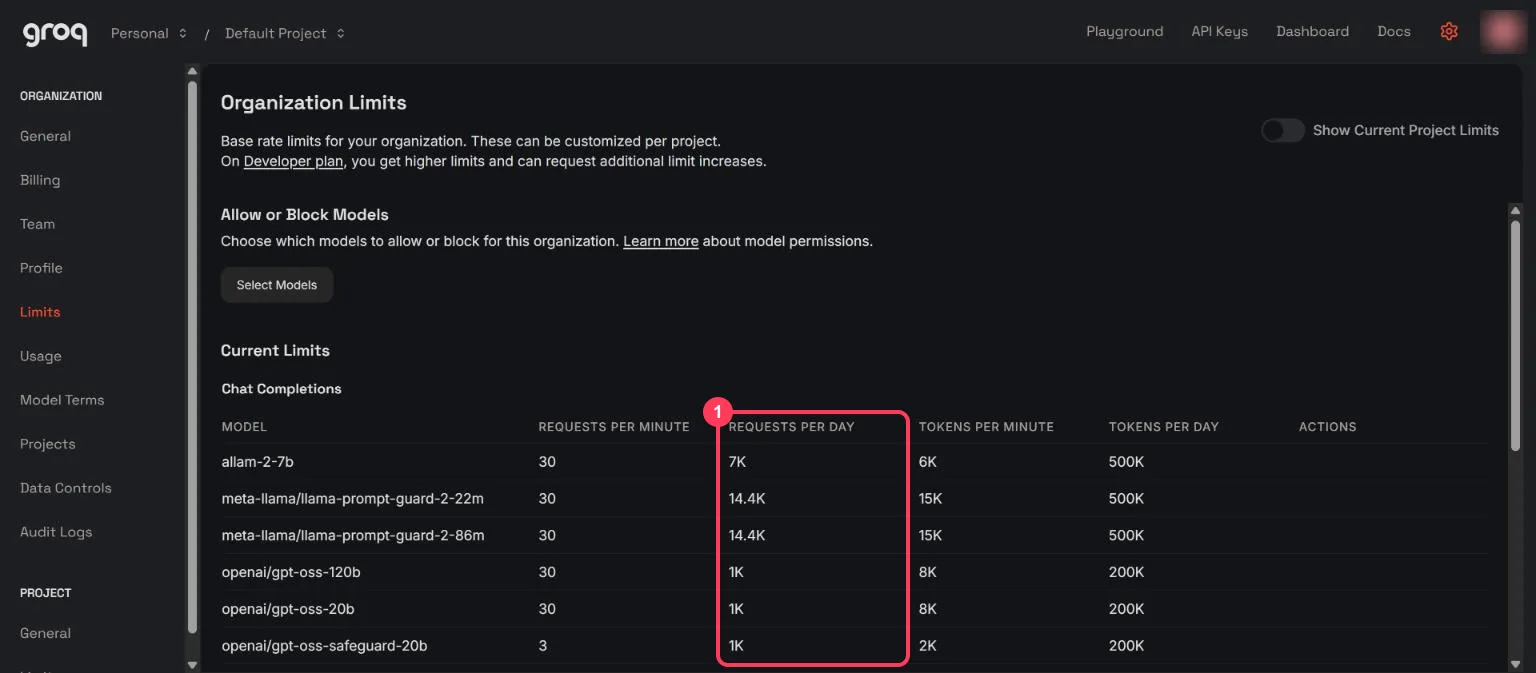
Click the gear icon at the top right, then Limits. The table lists every model your account can use, with its limits per minute and per day. The Requests per day column (box 1) is the number most people run into first.
The Free plan limits Groq publishes, read on 25 October 2026:
| Model | Requests per minute | Requests per day | Tokens per minute | Tokens per day |
|---|---|---|---|---|
| openai/gpt-oss-120b | 30 | 1,000 | 8,000 | 200,000 |
| openai/gpt-oss-20b | 30 | 1,000 | 8,000 | 200,000 |
| qwen/qwen3.8-27b | 30 | 1,000 | 8,000 | 200,000 |
| whisper-large-v3 (speech to text) | 20 | 2,000 | - | - |
| canopylabs/orpheus-v1-english (text to speech) | 10 | 100 | 1,200 | 3,600 |
Three rules from the same page:
- Limits apply to your whole organization, not to each key, so a second key does not give you more.
- You hit whichever limit you reach first. 30 tiny requests in one minute stop you even if you used few tokens.
- Cached tokens do not count towards the limits.
Your own Limits page can list more models than the public table, such as allam-2-7b at 7,000 requests a day.
Step 5: Send your first request (no programming)
Open a command window. On Windows, press the Start key, type PowerShell and open it. On a Mac, open Terminal.
Windows (PowerShell) - paste these lines, putting your key in place of YOUR_API_KEY:
$env:GROQ_API_KEY = "YOUR_API_KEY"
$body = '{"model":"openai/gpt-oss-20b","messages":[{"role":"user","content":"Explain how AI works in a few words"}]}'
$r = Invoke-RestMethod -Method Post -Uri "https://api.groq.com/openai/v1/chat/completions" -Headers @{ Authorization = "Bearer $env:GROQ_API_KEY" } -ContentType "application/json" -Body $body
$r.choices[0].message.content
Mac or Linux (Terminal):
export GROQ_API_KEY="YOUR_API_KEY"
curl https://api.groq.com/openai/v1/chat/completions \
  -H "Authorization: Bearer $GROQ_API_KEY" \
  -H "Content-Type: application/json" \
  -d '{
    "model": "openai/gpt-oss-20b",
    "messages": [{"role": "user", "content": "Explain how AI works in a few words"}]
  }'
You get a short answer back. That is one request from your 1,000 for the day.
Step 6: Use it from Python
Groq's quickstart installs its own Python library, which
reads your key from GROQ_API_KEY so the key never sits in the code:
pip install groq
import os
from groq import Groq

client = Groq(api_key=os.environ.get("GROQ_API_KEY"))

chat_completion = client.chat.completions.create(
    messages=[{"role": "user", "content": "Explain how AI works in a few words"}],
    model="openai/gpt-oss-20b",
)
print(chat_completion.choices[0].message.content)
Groq's quickstart example uses llama-3.3-70b-versatile. That model is not in the Free plan table,
so the example above uses openai/gpt-oss-20b.
Step 7: Use it in an app made for OpenAI
Groq's API works with most apps and libraries made for OpenAI (Groq's OpenAI compatibility page). In any app that asks for an OpenAI key, change three settings:
| Setting the app asks for | What to enter |
|---|---|
| API key | your Groq API key |
| Base URL (sometimes called API endpoint) | https://api.groq.com/openai/v1 |
| Model | openai/gpt-oss-20b (or another model from your Limits page) |
The same page lists the few OpenAI features Groq does not support yet, such as logprobs; sending
one returns a 400 error.
When something goes wrong
| What you see | What it means | What to do |
|---|---|---|
429 (too many requests) | You reached a limit | Groq's response includes a retry-after header with the seconds to wait. Daily limits need a longer wait, or a model with room left on your Limits page |
401 or invalid API key | The key is wrong or deleted | Copy it again, or create a new one on the API Keys page |
400 naming a field | The request used a feature Groq does not support | Remove that field; the OpenAI compatibility page lists them |
| model not found | The model name is wrong or not on your plan | Copy the exact ID from the Limits page, e.g. openai/gpt-oss-20b |
Words to know
- API key: the password that identifies you to the API and counts your usage. See what is an API key.
- Free plan: Groq's no-cost tier, with the limits above.
- RPM / RPD / TPM / TPD: requests per minute, requests per day, tokens per minute, tokens per day.
- Token: a piece of a word; the unit models read and write. See tokens and context windows.
- Base URL: the address an app sends its requests to.
More free AI API keys
Groq is one of the providers with a free tier. How to get AI API keys for free lists each one with its daily limit and source. For Google's models, see how to get a Gemini API key for free.
Frequently asked questions
Is the Groq API free?+
Yes. Groq has a Free plan with published limits, alongside its paid Developer plan. In October 2026 the Free plan allows 1,000 requests a day for gpt-oss-120b, gpt-oss-20b and Qwen3.8-27B.
Is the Groq API free and unlimited?+
Free, but not unlimited. Each model has limits per minute and per day: for the chat models, 30 requests a minute, 1,000 a day, 8,000 tokens a minute and 200,000 tokens a day.
What is the Groq API key free limit?+
Limits are per model and apply to your whole organization, not per key. Your console's Limits page (gear icon, then Limits) shows the exact figures for your account.
Which models are free on Groq?+
Groq's Free plan table lists openai/gpt-oss-120b, openai/gpt-oss-20b, qwen/qwen3.8-27b, the Whisper speech-to-text models, the Orpheus text-to-speech models and the Llama Prompt Guard models.
Do I need a credit card for a Groq API key?+
The Free plan costs $0 on Groq's Billing page and is the plan a new account starts on. The Developer plan is the paid one, billed per token at month-end.
Can I use a Groq API key in an app made for OpenAI?+
Yes. Set the base URL to https://api.groq.com/openai/v1, enter your Groq key, and use a Groq model name such as openai/gpt-oss-20b.
More free API key tutorials
- How to get a Gemini API key for free
- How to get an OpenRouter API key for free
- How to get a Cloudflare Workers AI API key for free
- How to get a Cohere API key for free
- How to get an Experimental Labs API key for free (with the $1 verification)
- Every free AI API and its daily limit
Want to use these APIs in a desktop app? OpenCode is a free, open-source AI coding app for Windows, Mac and Linux. How to add free API keys to OpenCode and pick a model.