How to Get an LLM7.io API Key for Free
Updated 26 October 2026.
In short: LLM7.io gives every account a free API key on its Free plan. Sign in at
token.llm7.io, open API Keys and create one. A free key allows
100,000 tokens a day and 60 requests a minute on 5 "turbo" models: gpt-oss 20B, Codestral,
MiniMax M2.7, Mistral Nemo and Nemotron 3 Nano. No credit card is needed. The base URL
https://api.llm7.io/v1 works in apps made for OpenAI.
What you need
- An LLM7.io account. Sign in at token.llm7.io; new accounts start on the Free plan with a $0 balance.
- A computer. Windows, Mac or Linux all work.
- Nothing to pay: turbo models are free within the daily allowance.
Step 1: Check your plan
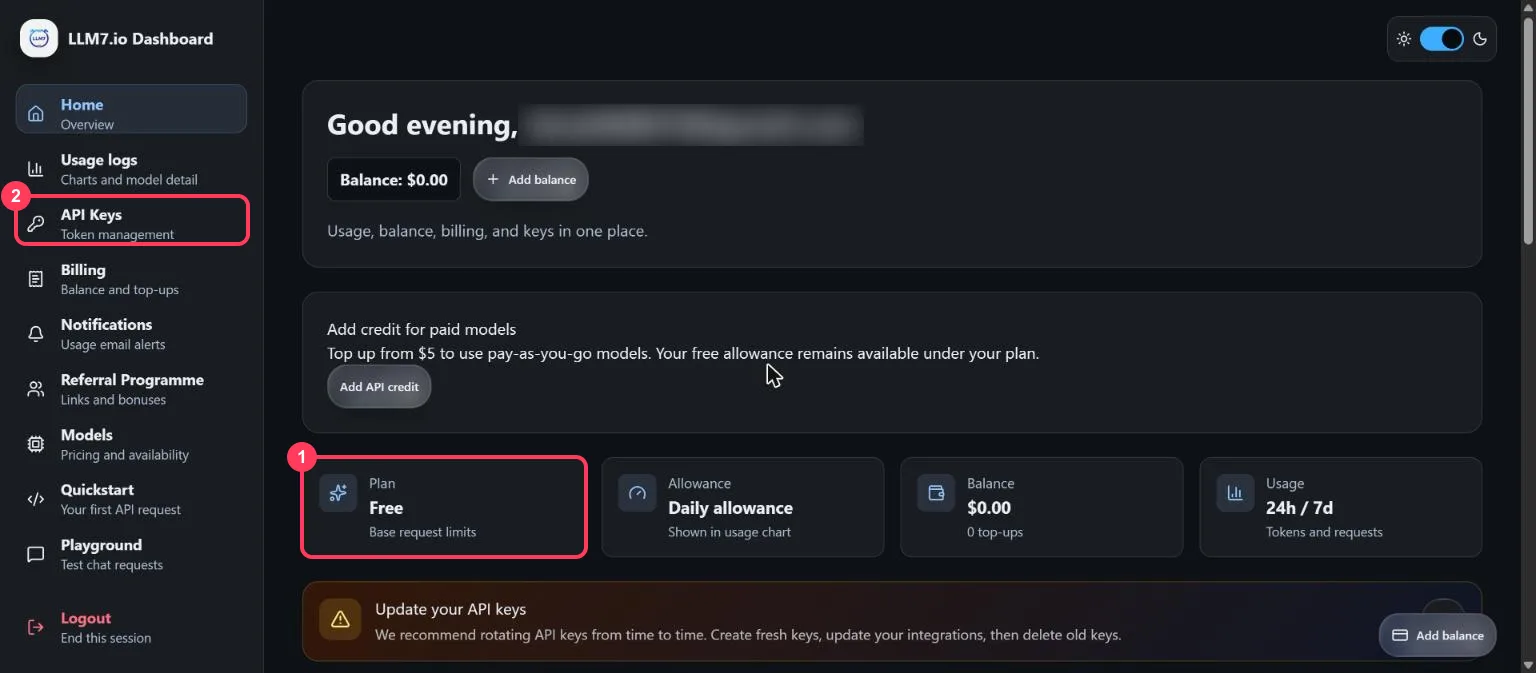
After signing in, the dashboard shows your Plan as Free (box 1). The free allowance is daily and shown in the usage chart further down. Click API Keys in the left menu (box 2).
Step 2: Create a key
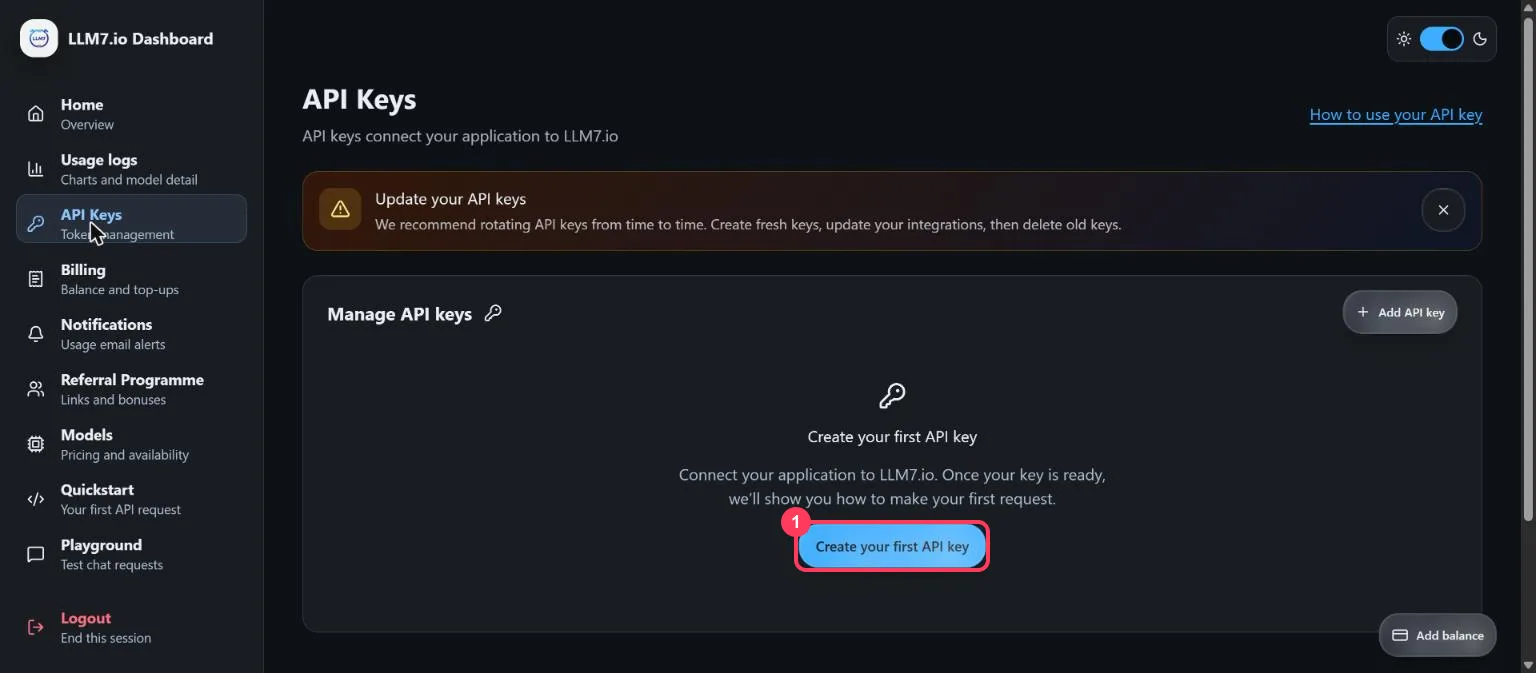
On the API Keys page, click Create your first API key (box 1). If you already have keys, the button is Add API key at the top right.
Step 3: Name the key and pick an expiry date
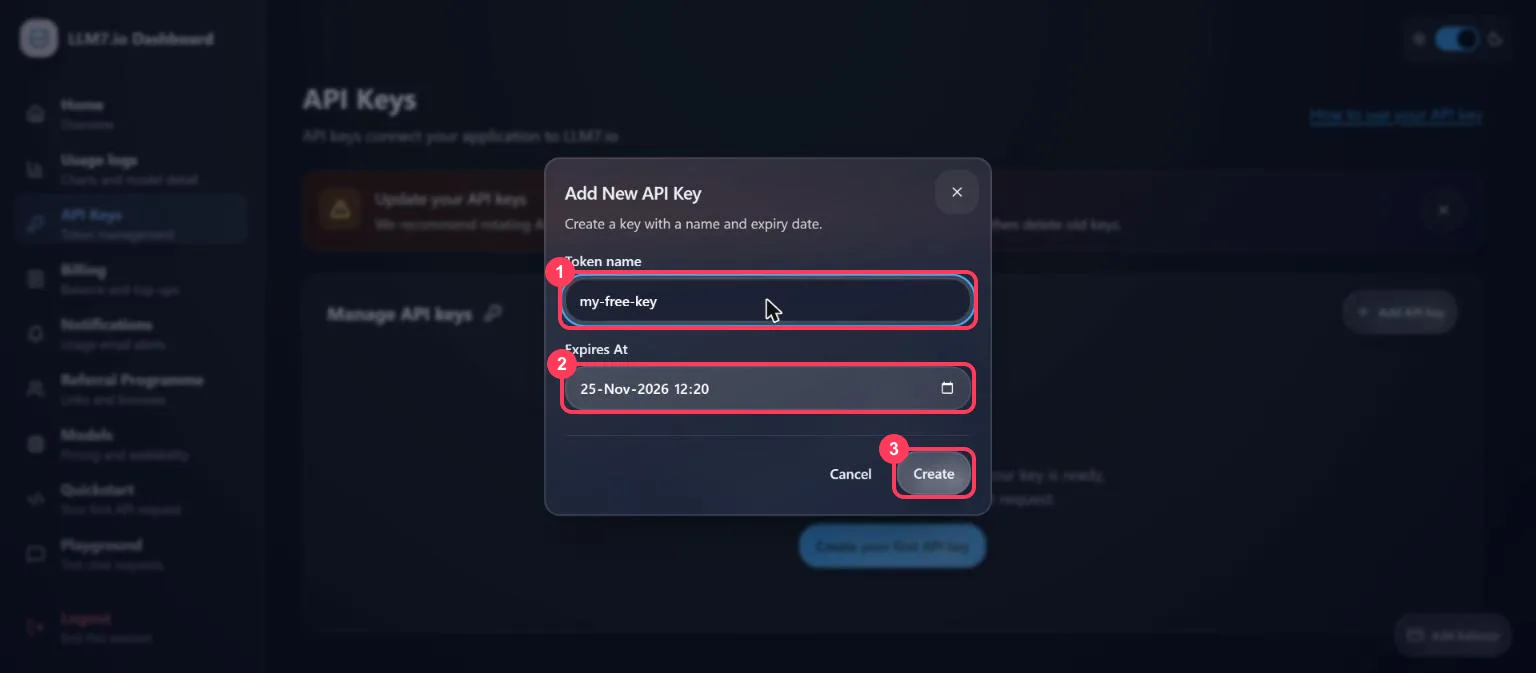
Type a Token name you will recognise, such as my-free-key (box 1). Expires At (box 2) is set
to 30 days from today; pick a later date if you need the key for longer. Click Create (box 3).
Step 4: Copy the key
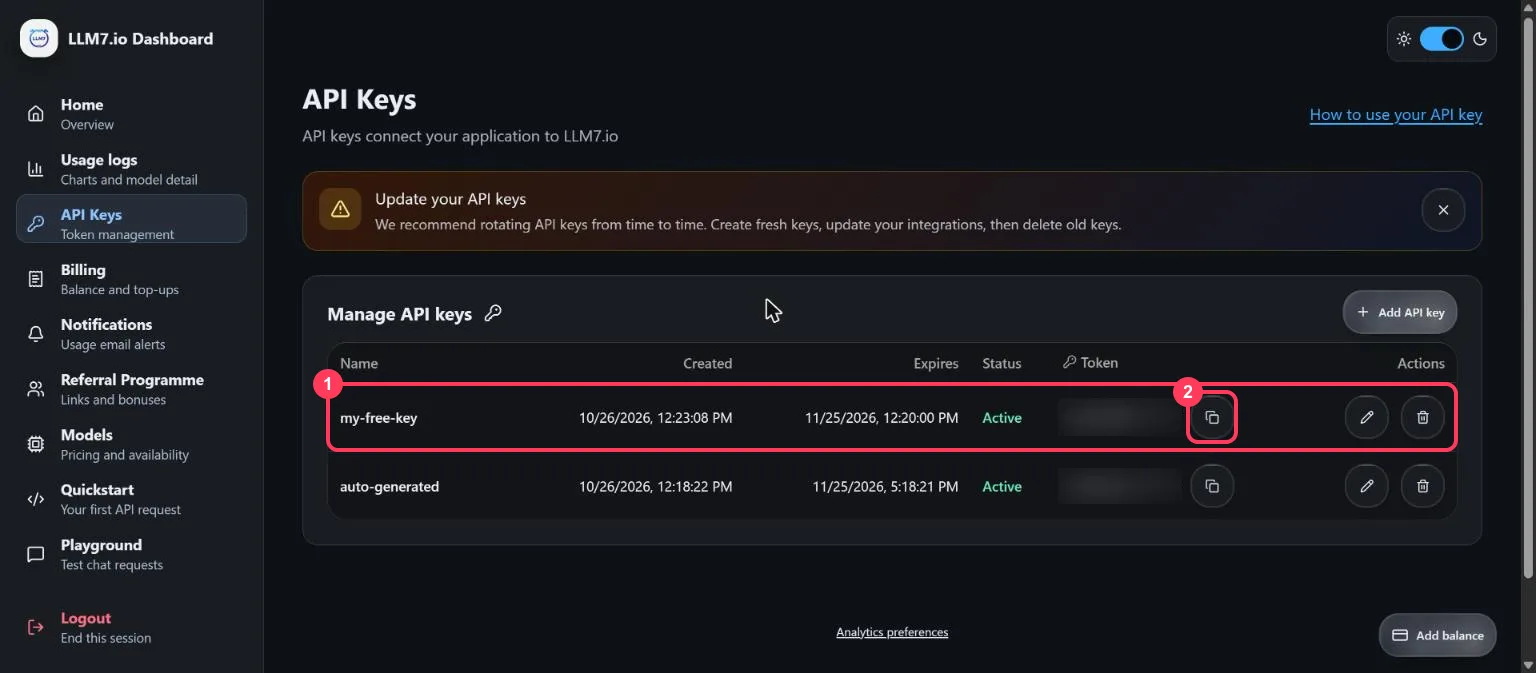
The new key appears in the list with its expiry date and status Active (box 1). Click the copy icon (box 2) to copy it. An auto-generated key may already be in the list; the dashboard creates it for its own Playground.
Keep the key private:
- Anyone who has your key can use your daily allowance.
- Never paste it into a website, a public code repository or a screenshot.
- If it leaks, click the bin icon next to it and create a new one.
- When a key expires, create a new one and update your apps.
Step 5: See which models are free
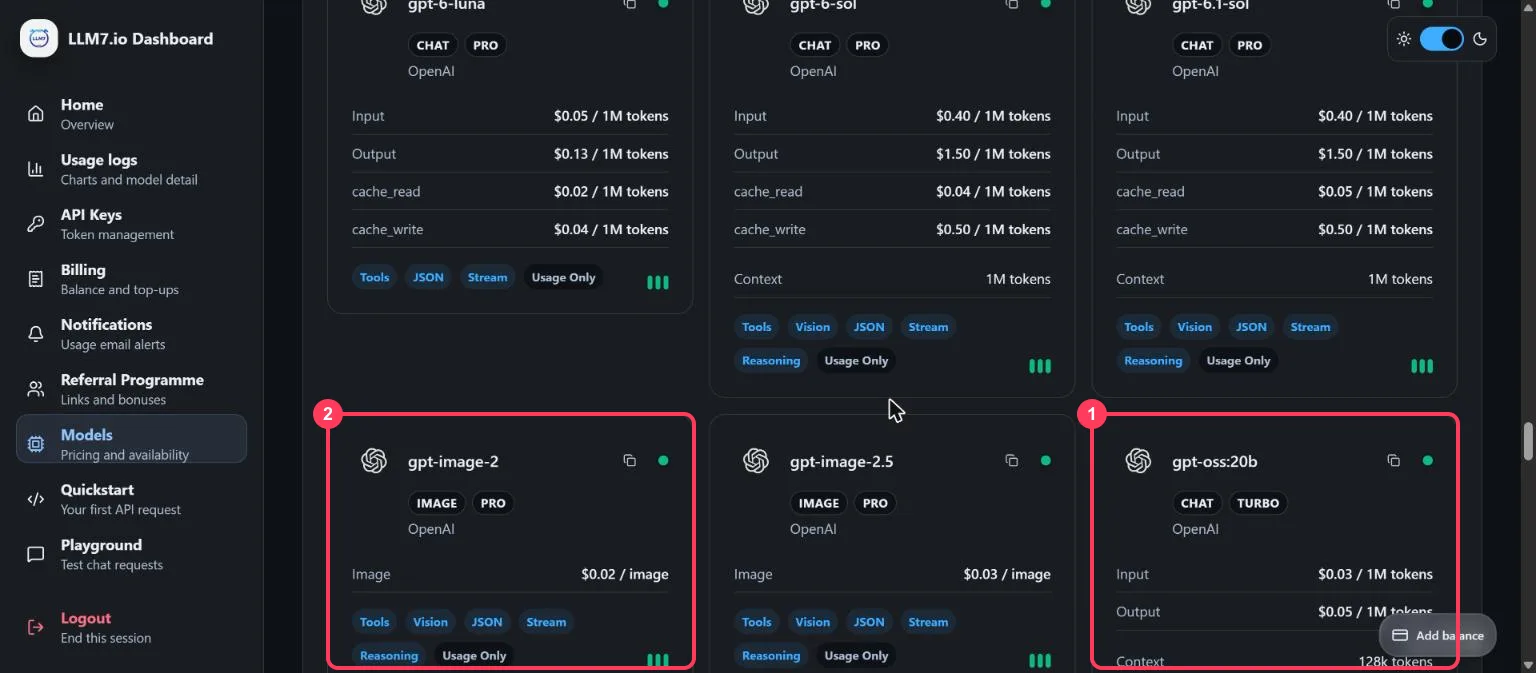
Click Models in the left menu. Each model card has a tier badge. TURBO models (box 1) are free on the Free plan; PRO models (box 2) need a paid balance.
| Model name to use | What it is |
|---|---|
gpt-oss:20b | OpenAI's open-weight gpt-oss, 20B |
codestral-latest | Mistral's coding model |
minimax-m2.7 | MiniMax M2.7, for coding and agents |
mistral-Nemo-Instruct-2407 | Mistral Nemo |
nemotron-3-nano:30b | NVIDIA Nemotron 3 Nano, 30B |
All five answered on a free key on 26 October 2026. PRO models, such as GPT-6 Luna or Claude Haiku
5.5, answer with error 402 "Insufficient balance". The model list changes often; the Models page
shows the current tiers.
Step 6: Try it in the Playground
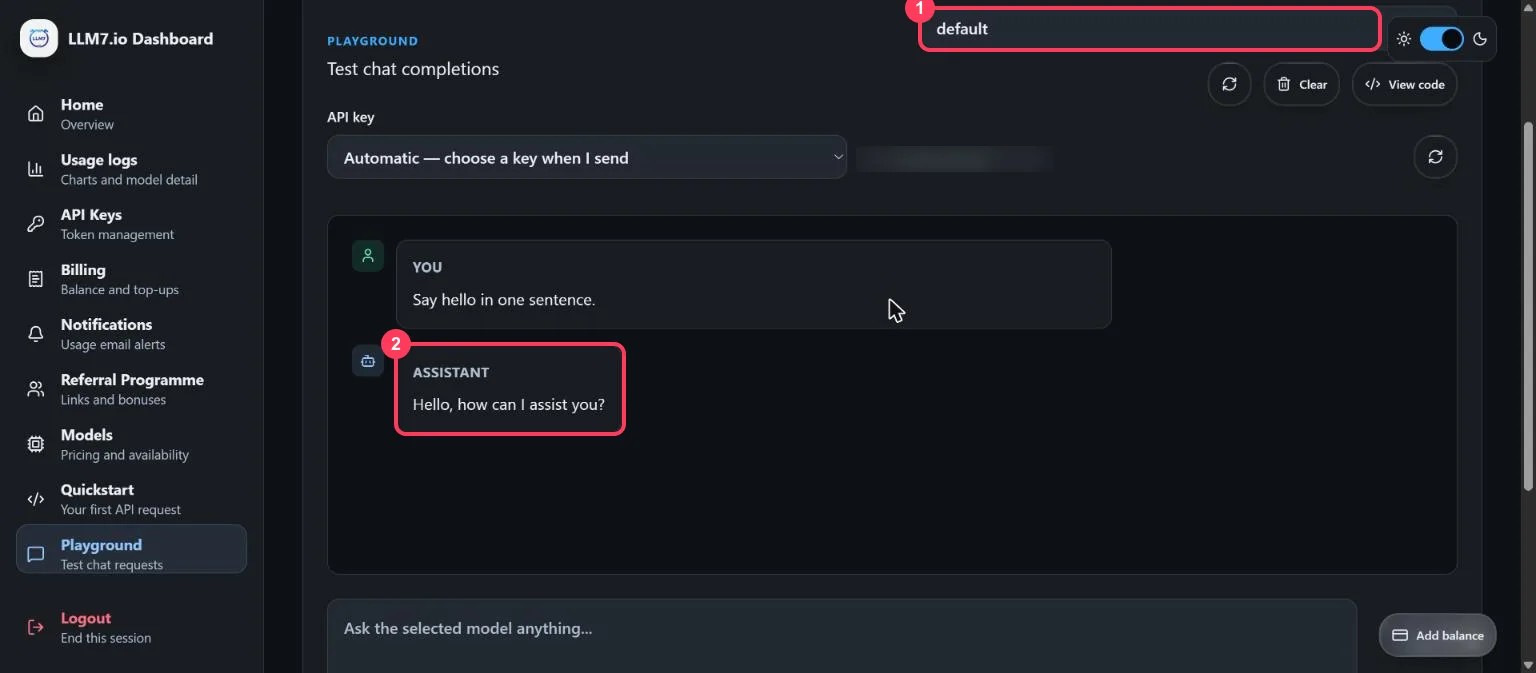
Click Playground. The model list (box 1) starts on default. Type a message, or pick a suggestion, and click Send. The answer appears below (box 2). View code shows the same request as code.
Step 7: Know your free limits
| What | Free key limit |
|---|---|
| Tokens | 100,000 a day (input plus output) |
| Requests | 1 a second, 60 a minute, 250 an hour |
| Models | The 5 TURBO models in Step 5 |
| Key lifetime | Until the expiry date set when the key was made |
LLM7 says free quotas may be reduced without notice. The full table is on its limits page. Pro costs $12 a month, and PRO models can also be used with a prepaid balance from $5.
Step 8: Send your first request (no programming)
Open a command window. On Windows, press the Start key, type PowerShell and open it. On a Mac,
open Terminal. Put your key in place of YOUR_API_KEY.
Windows (PowerShell):
$env:LLM7_API_KEY = "YOUR_API_KEY"
$body = '{"model":"gpt-oss:20b","messages":[{"role":"user","content":"Explain how AI works in a few words"}]}'
$r = Invoke-RestMethod -Method Post -Uri "https://api.llm7.io/v1/chat/completions" -Headers @{ Authorization = "Bearer $env:LLM7_API_KEY" } -ContentType "application/json" -Body $body
$r.choices[0].message.content
Mac or Linux (Terminal):
export LLM7_API_KEY="YOUR_API_KEY"
curl https://api.llm7.io/v1/chat/completions \
  -H "Authorization: Bearer $LLM7_API_KEY" \
  -H "Content-Type: application/json" \
  -d '{
    "model": "gpt-oss:20b",
    "messages": [{"role": "user", "content": "Explain how AI works in a few words"}]
  }'
You get a short answer back, and the tokens show in the dashboard's usage chart.
Step 9: Use it from Python
LLM7's quickstart uses OpenAI's Python library:
pip install openai
import os
from openai import OpenAI

client = OpenAI(base_url="https://api.llm7.io/v1", api_key=os.environ["LLM7_API_KEY"])
reply = client.chat.completions.create(
    model="gpt-oss:20b",
    messages=[{"role": "user", "content": "Explain how AI works in a few words"}],
)
print(reply.choices[0].message.content)
Step 10: Use it in an app made for OpenAI
In any app that asks for an OpenAI key, change three settings:
| Setting the app asks for | What to enter |
|---|---|
| API key | your LLM7.io key |
| Base URL (sometimes called API endpoint) | https://api.llm7.io/v1 |
| Model | one of the 5 TURBO models, such as gpt-oss:20b |
When something goes wrong
| What you see | What it means | What to do |
|---|---|---|
402 "Insufficient balance" | The model is a PRO model | Change the model to one of the 5 TURBO models and continue |
429 too many requests | Over 1 a second, 60 a minute or 250 an hour, or the 100,000 daily tokens are used | Wait, then send again; the daily tokens refill over 24 hours |
401 unauthorized | The key is wrong, deleted or expired | Create a new key on the API Keys page |
| Empty answer | A reasoning model used the whole reply length on thinking | Allow a longer reply (max_tokens) or change the model |
Words to know
- API key (token): the password an app uses to call LLM7's models. See what is an API key.
- TURBO / PRO: LLM7's model tiers; TURBO models are free on the Free plan, PRO models need a balance.
- Base URL: the address an app sends its requests to.
- Third-party API key: a key from a service that runs models made by other companies, such as OpenAI's gpt-oss or Mistral's Codestral.
- Token: a piece of a word; the unit models read and write. See tokens and context windows.
More free AI API keys
LLM7.io is one of the third-party services with a free tier. How to get AI API keys for free lists each one with its limit and source. For more free models, see how to get an Ollama API key for free (7 free cloud models).
Frequently asked questions
Is the LLM7 API free?+
Yes, on the Free plan. A free key allows 100,000 tokens a day on LLM7's TURBO models, with no credit card. PRO models need a paid balance.
Which LLM7 models are free?+
On 26 October 2026, the TURBO models: gpt-oss:20b, codestral-latest, minimax-m2.7, mistral-Nemo-Instruct-2407 and nemotron-3-nano:30b. The Models page shows each model's tier.
What are the LLM7 free limits?+
100,000 tokens a day (input plus output), 1 request a second, 60 a minute and 250 an hour. LLM7 says free quotas may be reduced without notice.
Do LLM7 API keys expire?+
Yes. Each key gets an expiry date when it is created, 30 days ahead by default. A later date can be picked, and a new key can be made at any time.
What is the LLM7 base URL?+
https://api.llm7.io/v1. It works with OpenAI's libraries and apps made for OpenAI, with your LLM7 key and a TURBO model name such as gpt-oss:20b.
More free API key tutorials
- How to get a Gemini API key for free
- How to get a Groq API key for free
- How to get a Cloudflare Workers AI API key for free
- How to get a Cohere API key for free
- How to get an OpenRouter API key for free
- How to get an Experimental Labs API key for free (with the $1 verification)
- How to get an Ollama API key for free
- Every free AI API and its daily limit
Want to use these APIs in a desktop app? OpenCode is a free, open-source AI coding app for Windows, Mac and Linux. How to add free API keys to OpenCode and pick a model.