How to Use Kilo Code Free Models (No API Key)
Updated 27 October 2026.
In short: Kilo Code's AI Gateway has free models that work with no account and no API key.
Send requests to https://ai-gateway.kilo.ai/api/v1 with a model name ending in :free, or with
kilo-auto/free, which picks a free model for you. Without signing in, the limit is 200 requests an
hour per IP address. The free models change often; the live catalog lists them.
What you need
- Nothing to sign up for. Free models work for anonymous and signed-in users.
- A computer. Windows, Mac or Linux all work.
- Nothing to pay. Kilo's docs say the free models are "available at no cost, subject to rate limits" (box 1).
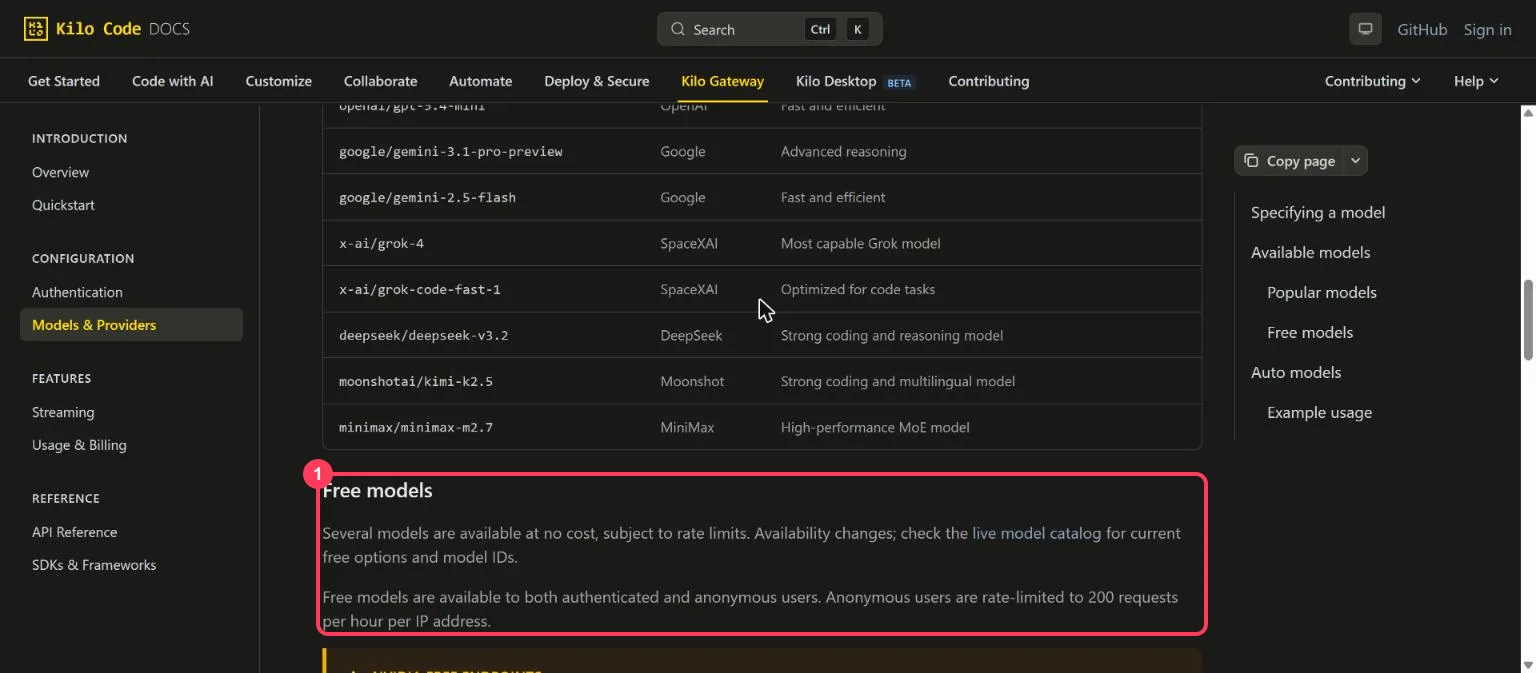
Step 1: See which models are free today
The live catalog is at https://api.kilo.ai/api/gateway/models. Free models end in :free (or
-free). On 27 October 2026 it listed these free chat models:
| Model name | Made by |
|---|---|
kilo-auto/free | Kilo: picks one of the free models for each request |
nvidia/nemotron-3-ultra-550b-a55b:free | NVIDIA |
nvidia/nemotron-3-super-120b-a12b:free | NVIDIA |
nvidia/nemotron-3.5-super-vl:free | NVIDIA (reads images) |
reflection/beam-free | Reflection (Beam) |
poolside/laguna-s-2.1:free, poolside/laguna-xs-2.1:free | Poolside (coding) |
cohere/north-mini-code:free | Cohere (coding) |
recursive/flint-v1.0:free | Recursive (coding) |
openrouter/free | OpenRouter's free-model router |
kilo-auto/free, Beam, Laguna S 2.1, North Mini Code, Nemotron 3 Ultra and openrouter/free all
answered without a key on 27 October 2026.
Step 2: Send your first request (no key, no sign-up)
Open a command window. On Windows, press the Start key, type PowerShell and open it. On a Mac, open Terminal.
Windows (PowerShell):
$body = '{"model":"kilo-auto/free","messages":[{"role":"user","content":"Explain how AI works in a few words"}]}'
$r = Invoke-RestMethod -Method Post -Uri "https://ai-gateway.kilo.ai/api/v1/chat/completions" -ContentType "application/json" -Body $body
"$($r.model): $($r.choices[0].message.content)"
Mac or Linux (Terminal):
curl https://ai-gateway.kilo.ai/api/v1/chat/completions \
  -H "Content-Type: application/json" \
  -d '{
    "model": "kilo-auto/free",
    "messages": [{"role": "user", "content": "Explain how AI works in a few words"}]
  }'
The answer includes model, which says which free model kilo-auto/free picked; on 27 October 2026
it was stealth/glyph-cluster.
Step 3: Use it from Python
Kilo's gateway follows OpenAI's chat format, so OpenAI's Python library works. The library needs some
value for api_key; with no Kilo account, any placeholder text is enough for free models.
pip install openai
from openai import OpenAI

client = OpenAI(base_url="https://ai-gateway.kilo.ai/api/v1", api_key="anonymous")
reply = client.chat.completions.create(
    model="reflection/beam-free",
    messages=[{"role": "user", "content": "Explain how AI works in a few words"}],
)
print(reply.choices[0].message.content)
Step 4: Use it in an app made for OpenAI
| Setting the app asks for | What to enter |
|---|---|
| API key | any text if the app requires one (or a Kilo key from a free account) |
| Base URL (sometimes called API endpoint) | https://ai-gateway.kilo.ai/api/v1 |
| Model | kilo-auto/free, or a :free model from Step 1 |
Know the limits
| What | Free models |
|---|---|
| Without signing in | 200 requests an hour per IP address |
| Which models | The changing free list in the live catalog |
| NVIDIA free endpoints | For trial use only; NVIDIA logs the use, so do not send personal or private data |
When something goes wrong
| What you see | What it means | What to do |
|---|---|---|
404 "Provider returned error" | That free model's provider is not answering now | Change the model, for example to kilo-auto/free, and continue |
429 too many requests | Over 200 requests in an hour from your IP address | Wait, or sign in to a free Kilo account |
| Empty answer | A reasoning model used the whole reply length on thinking | Allow a longer reply (max_tokens) or change the model |
Words to know
- Kilo Code: an AI coding tool; its AI Gateway gives one address for hundreds of models.
- Anonymous use: calling the API with no account and no key.
:free: the ending that marks a free model's name.- Base URL: the address an app sends its requests to.
- Token: a piece of a word; the unit models read and write. See tokens and context windows.
More free AI API keys
Kilo's free models need no key at all. For free keys with a daily allowance, see how to get AI API keys for free, which lists each one with its limit and source.
Frequently asked questions
Are Kilo Code free models really free?+
Yes. Kilo's AI Gateway has free models, marked :free, that work with no account and no API key, subject to rate limits.
What is the Kilo Code free models rate limit?+
Without signing in, 200 requests an hour per IP address. Kilo's docs say the free models are subject to rate limits.
Which Kilo Code free models are there?+
On 27 October 2026: kilo-auto/free, NVIDIA Nemotron 3 Ultra and Super, Nemotron 3.5 Super VL, Reflection Beam, Poolside Laguna S and XS 2.1, Cohere North Mini Code, Recursive Flint and openrouter/free. The live catalog lists the current set.
What is kilo-auto/free?+
A model name that makes Kilo pick one of its free models for each request; the answer says which model it used.
What is the Kilo Gateway base URL?+
https://ai-gateway.kilo.ai/api/v1, in OpenAI's chat format. For free models, an app that requires a key can use any placeholder text.
More free API key tutorials
- How to get a Gemini API key for free
- How to get a Groq API key for free
- How to get a Cloudflare Workers AI API key for free
- How to get a Cohere API key for free
- How to get an OpenRouter API key for free
- How to get an Experimental Labs API key for free (with the $1 verification)
- How to get a Requesty API key for free
- How to get an LLM7 API key for free
- How to use a free AI API without an API key
- How to get an Ollama API key for free
- How to get a Gonka AI API key for free
- How to get a Perplexity API key for free
- Where Qwen is free
- Where Mistral models are free
- The Grok API, checked on a new account
- Where DeepSeek models are free
- Where GLM models are free
- Where OpenAI models are free
- Every free AI API and its daily limit
By model: DeepSeek · OpenAI (GPT) · Claude · Grok · Perplexity · Mistral · Kimi · Qwen · GLM · MiniMax · Llama · Nemotron · Gemma · gpt-oss
Want to use these APIs in a desktop app? OpenCode is a free, open-source AI coding app for Windows, Mac and Linux. How to add free API keys to OpenCode and pick a model.