How to Get a Gonka AI API Key for Free
Updated 27 October 2026.
In short: Easy GonkaAI API (gonka-api.org) gives a new account 10 million free tokens, a $0.20 balance, with no credit card and no phone check. One key reaches three models on the Gonka GPU network: DeepSeek V4 Flash, MiniMax M2.7 and GLM-5.3-Flash. It uses OpenAI's format. It is a separate service from Gonka Broker, which asks for SMS verification.
What you need
- An account at gonka-api.org. Its home page says "Get Started + 10M tokens free" and "No card required".
- A computer. Windows, Mac or Linux all work.
- Nothing to pay. The free tokens are a starting balance; top-ups are paid in crypto.
Step 1: Check the free balance and the models
After signing up, the Dashboard shows a Balance of $0.20, about 10,000,000 tokens (box 1), and the Available models with their prices (box 2). A key is ready under API keys; New Key makes another (box 3).
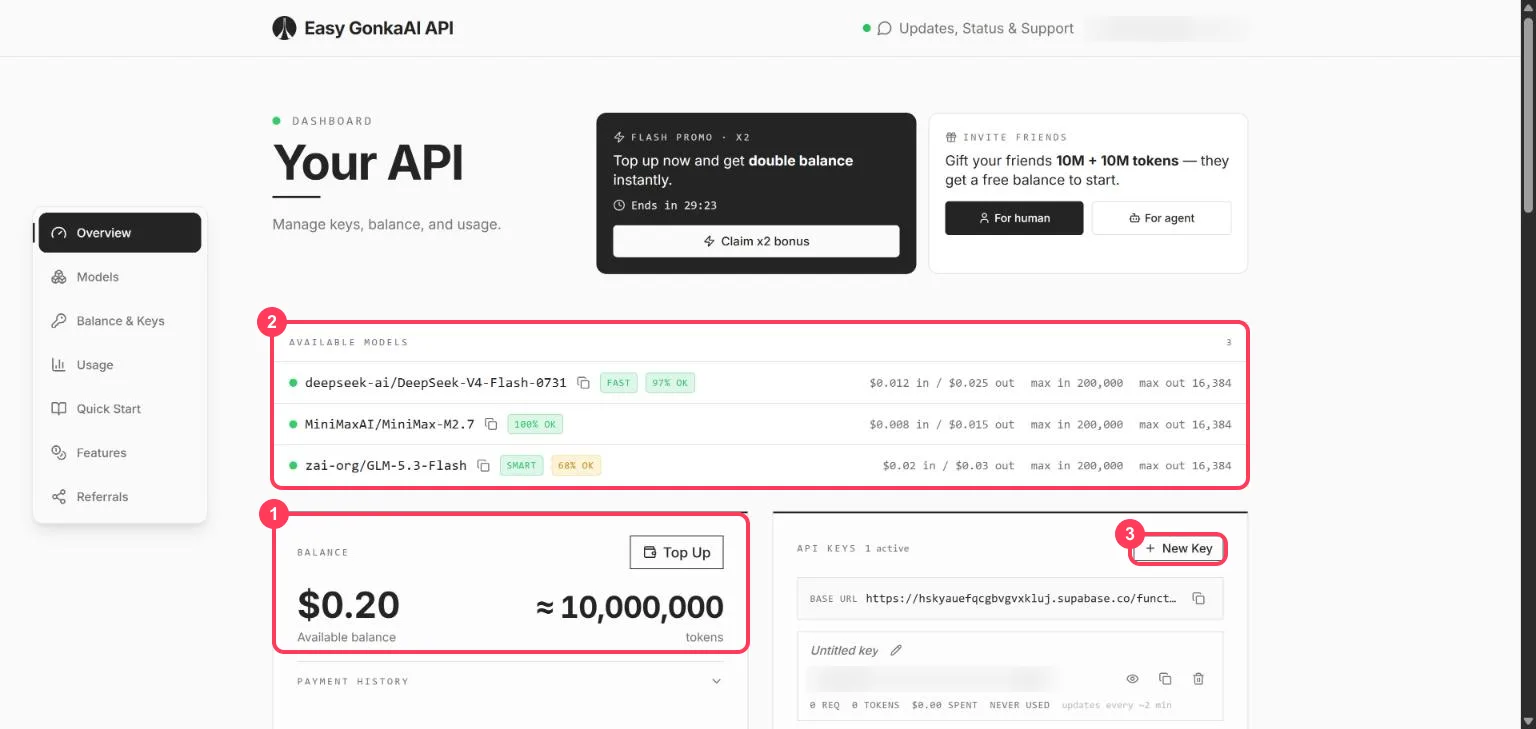
| Model name | Price per 1M tokens (in / out) | Answered on the free balance |
|---|---|---|
deepseek-ai/DeepSeek-V4-Flash-0731 | $0.012 / $0.025 | Yes |
MiniMaxAI/MiniMax-M2.7 | $0.008 / $0.015 | Yes (its reply includes its <think> reasoning) |
zai-org/GLM-5.3-Flash | $0.02 / $0.03 | Yes |
Checked on 27 October 2026. Each model allows up to 200,000 input tokens and 16,384 output tokens per request. At these prices, $0.20 covers about 10 million tokens.
Step 2: Copy the key
Under API keys, click the eye icon to show the key and the copy icon to copy it. Keep it private: anyone who has it can spend your balance. The bin icon deletes it.
Step 3: Send your first request (no programming)
The dashboard shows the Base URL: https://hskyauefqcgbvgvxkluj.supabase.co/functions/v1/gonka.
Open a command window. On Windows, press the Start key, type PowerShell and open it. On a Mac,
open Terminal. Put your key in place of YOUR_API_KEY.
Windows (PowerShell):
$env:GONKA_KEY = "YOUR_API_KEY"
$body = '{"model":"zai-org/GLM-5.3-Flash","messages":[{"role":"user","content":"Explain how AI works in a few words"}]}'
$r = Invoke-RestMethod -Method Post -Uri "https://hskyauefqcgbvgvxkluj.supabase.co/functions/v1/gonka/chat/completions" -Headers @{ Authorization = "Bearer $env:GONKA_KEY" } -ContentType "application/json" -Body $body
$r.choices[0].message.content
Mac or Linux (Terminal):
export GONKA_KEY="YOUR_API_KEY"
curl https://hskyauefqcgbvgvxkluj.supabase.co/functions/v1/gonka/chat/completions \
  -H "Authorization: Bearer $GONKA_KEY" \
  -H "Content-Type: application/json" \
  -d '{
    "model": "zai-org/GLM-5.3-Flash",
    "messages": [{"role": "user", "content": "Explain how AI works in a few words"}]
  }'
Step 4: Use it in an app made for OpenAI
| Setting the app asks for | What to enter |
|---|---|
| API key | your Easy GonkaAI key |
| Base URL (sometimes called API endpoint) | https://hskyauefqcgbvgvxkluj.supabase.co/functions/v1/gonka |
| Model | deepseek-ai/DeepSeek-V4-Flash-0731, MiniMaxAI/MiniMax-M2.7 or zai-org/GLM-5.3-Flash |
Before you use it
- It is a small reseller. Easy GonkaAI API resells access to the Gonka decentralised GPU network; its API runs from a Supabase function, not its own domain.
- Optional settings in the dashboard, all off by default: web search (billed per request), image description, a PII sanitizer that masks names, emails, phones and keys before they reach the network, and retries when the network is busy.
- Top-ups are paid in crypto. The dashboard also shows a timed "double balance" offer and a referral scheme; neither is needed for the free tokens.
When something goes wrong
| What you see | What it means | What to do |
|---|---|---|
429 too many requests | The Gonka network is busy | Wait and send again, or turn on Patient Retry in the dashboard |
Reply starts with <think> | MiniMax M2.7 includes its reasoning in the text | Remove the part before </think>, or use another model |
401 unauthorized | The key is wrong or deleted | Copy it again from the dashboard |
| Balance error | The free tokens are used up | Top up, or use another free API |
Words to know
- Gonka: a decentralised network of GPUs that runs open models.
- Balance: the money in the account; the free tokens arrive as a $0.20 balance.
- API key: the password an app uses to call a model. See what is an API key.
- Token: a piece of a word; the unit models read and write. See tokens and context windows.
More free AI API keys
How to get AI API keys for free lists every free tier with its limit and source.
Frequently asked questions
Is the Gonka AI API free?+
Easy GonkaAI API (gonka-api.org) gives a new account 10 million tokens free, a $0.20 balance, with no card and no phone check. After that, top-ups are paid in crypto.
Which models does the free balance cover?+
DeepSeek V4 Flash, MiniMax M2.7 and GLM-5.3-Flash; all three answered on the free balance on 27 October 2026.
Is gonka-api.org the same as Gonka Broker?+
No. Both resell the Gonka GPU network, but Gonka Broker (gonkabroker.com) asks for SMS phone verification for its free monthly tokens; Easy GonkaAI API gives a one-time balance with no phone check.
What is the Gonka AI base URL?+
https://hskyauefqcgbvgvxkluj.supabase.co/functions/v1/gonka, in OpenAI's format, as shown on the dashboard.
More free API key tutorials
- How to get a Gemini API key for free
- How to get a Groq API key for free
- How to get a Cloudflare Workers AI API key for free
- How to get a Cohere API key for free
- How to get an OpenRouter API key for free
- How to get an Experimental Labs API key for free (with the $1 verification)
- How to get a Requesty API key for free
- How to use Kilo Code free models (no API key)
- How to get an LLM7 API key for free
- How to use a free AI API without an API key
- How to get an Ollama API key for free
- How to get a Perplexity API key for free
- Where Qwen is free
- Where Mistral models are free
- The Grok API, checked on a new account
- Where DeepSeek models are free
- Where GLM models are free
- Where OpenAI models are free
- Every free AI API and its daily limit
By model: DeepSeek · OpenAI (GPT) · Claude · Grok · Perplexity · Mistral · Kimi · Qwen · GLM · MiniMax · Llama · Nemotron · Gemma · gpt-oss
Want to use these APIs in a desktop app? OpenCode is a free, open-source AI coding app for Windows, Mac and Linux. How to add free API keys to OpenCode and pick a model.