How to Get Claude Max Free for 6 Months
Updated 31 October 2026.
In short: Anthropic's Claude for Open Source program gives open-source maintainers and contributors 6 months of Claude Ultra for free. Ultra is the plan above Max: it includes everything in Max, plus no 5-hour limit and 10x Pro usage every week. The program is capped at 10,000 approved recipients, and every application is reviewed by Anthropic.
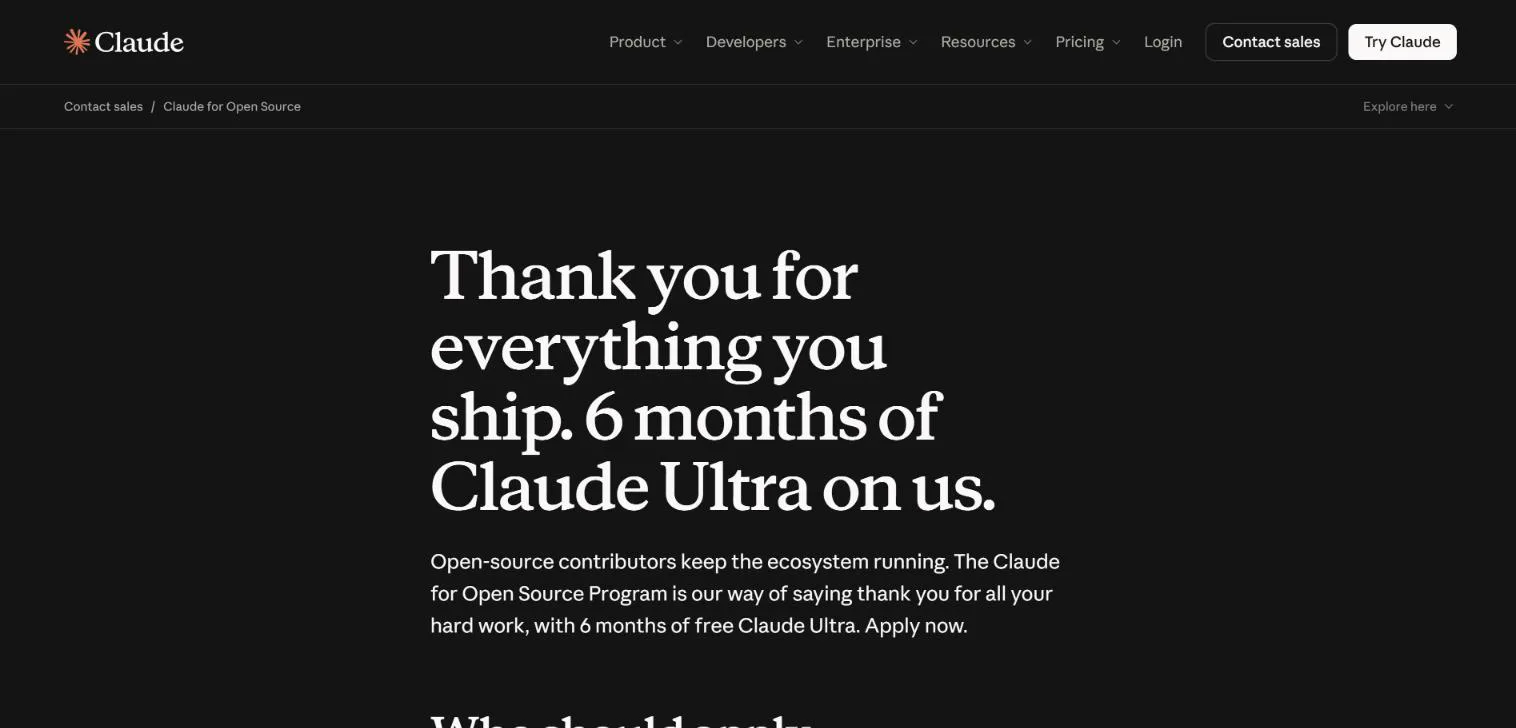
What the free plan includes
The program gives Claude Ultra, not Max. On Anthropic's pricing page the two plans compare like this:
| Max | Ultra (free in the program) | |
|---|---|---|
| Price | $100 a month | $200 a month |
| Usage every 5 hours | 5x Pro | No 5-hour limit (verified accounts) |
| Usage every week | 5x Pro | 10x Pro |
| Monthly API credits | $100 | $200 |
| Claude Code | Included | Included |
| Fable | Up to half the weekly limit | Up to half the weekly limit |
The free period is 6 consecutive months from the day you activate it. The base Ultra subscription is not charged during that time, but overages can be charged at Anthropic's standard overage pricing.
Claude for Open Source program eligibility
You need to meet at least one of these, according to the program terms:
- Maintainers and library authors: projects you maintain have 500 or more dependent repositories, or 100 or more dependent packages, or 200,000 or more combined monthly downloads on a public registry (npm, PyPI, crates.io, RubyGems, Packagist, Maven or similar).
- Core contributors: you are a listed committer or maintainer of a recognized foundation or language project, such as CPython, the Rust team, the Node.js TSC, an Apache PMC, CNCF, Kubernetes, the Linux kernel, Django or Rails.
- Active contributors: you authored 100 or more pull requests merged into public repositories you don't own in the last 12 months.
- Community builders: a repository you maintain had 20 or more unique external contributors with merged pull requests in the last 12 months.
- Critical infrastructure: a repository you maintain has an OpenSSF criticality score of 0.4 or higher.
If none of these fit but the open-source ecosystem depends on something you maintain, you can still apply under the Ecosystem Impact Track and explain the project's importance in the application.
Every applicant must also:
- be a person (not a company), aged 18 or older (or the age of majority where you live);
- live where Claude.ai is offered and not be subject to US export or sanctions restrictions;
- have a GitHub account in good standing that is at least two years old;
- have public open-source activity (commits, pull requests, reviews or releases) in the last 90 days;
- maintain or contribute to a project under an OSI-approved license (MIT, Apache 2.0, BSD, GPL and others);
- not work for Anthropic, or be family or household of someone who does.
Meeting a threshold does not guarantee approval. Anthropic weighs the quality of contributions, not only their number, and discounts activity it judges trivial, automated or inflated.
How to apply to the Claude for Open Source program
- Open the Claude for Open Source page.
- Enter your first name, last name and email. If you already use Claude, enter your Claude account email.
- Click Select repo on GitHub, sign in with GitHub and choose your project. Program emails go to the email on your GitHub account.
- Describe the project's reach and impact: download numbers, GitHub activity, who depends on it, or the gap it fills.
- Describe how you will use the subscription for the project, then submit.
Apply once. Duplicate applications, including ones from another email or account, are disregarded and do not speed up review.
After you apply
- Approval: Anthropic contacts you only if you are approved. No reply does not mean you were rejected, and there is no fixed review time.
- Activation: approved applicants get an activation link at their GitHub email. It must be used within 90 days, or the subscription is forfeited.
- If you already pay for Claude: your billing is paused for the 6 months and resumes at your plan and rate afterwards, unless you cancel. Anthropic emails at least 30 days before billing resumes.
- If you are on the free plan: your account returns to the free plan after 6 months. Nothing renews automatically.
- Personal use only: the subscription can't be transferred, sold or shared.
- Publicity: by accepting, you allow Anthropic to name you, your GitHub username and your projects as program recipients.
After the 6 months you can re-apply while the program is still open. Anthropic can change or close the program at any time.
Frequently asked questions
Can I get Claude Max for free?+
Through the Claude for Open Source program, eligible open-source maintainers and contributors get 6 months of Claude Ultra free. Ultra is the plan above Max and includes everything in Max.
Is the free plan Claude Max or Claude Ultra?+
Claude Ultra. It costs $200 a month and adds no 5-hour limit for verified accounts, 10x Pro weekly usage and $200 a month in API credits on top of Max.
Who qualifies for Claude for Open Source?+
Maintainers of projects with 500+ dependent repositories, 100+ dependent packages or 200,000+ monthly downloads; listed committers on recognized foundation or language projects; authors of 100+ merged pull requests to others' repositories in 12 months; maintainers of a repository with 20+ external contributors in 12 months; or of a repository with an OpenSSF criticality score of 0.4 or higher. A GitHub account at least two years old and open-source activity in the last 90 days are also required.
How do I apply to the Claude for Open Source program?+
Fill in the form on claude.com/contact-sales/claude-for-oss: name and email, select your repository by signing in with GitHub, describe the project's reach and impact, and how you will use the subscription. Anthropic contacts only approved applicants.
How many people get the free Claude plan?+
The program is limited to 10,000 approved recipients unless Anthropic raises the cap.
What happens after the 6 free months?+
The free subscription ends and does not renew. A paused paid plan resumes at its previous rate unless cancelled; a free account returns to the free plan.
More free API key tutorials
- How to get a Gemini API key for free
- How to get a Groq API key for free
- How to get a Cloudflare Workers AI API key for free
- How to get a Cohere API key for free
- How to get an OpenRouter API key for free
- How to get an Experimental Labs API key for free (with the $1 verification)
- How to get a Requesty API key for free
- How to use Kilo Code free models (no API key)
- How to get an LLM7 API key for free
- How to use a free AI API without an API key
- How to get an Ollama API key for free
- How to get a Gonka AI API key for free
- How to get a Perplexity API key for free
- Where Qwen is free
- Where Mistral models are free
- The Grok API, checked on a new account
- Where DeepSeek models are free
- Where GLM models are free
- Where OpenAI models are free
- Every free AI API and its daily limit
By model: DeepSeek · OpenAI (GPT) · Claude · Grok · Perplexity · Mistral · Kimi · Qwen · GLM · MiniMax · Llama · Nemotron · Gemma · gpt-oss
Want to use these APIs in a desktop app? OpenCode is a free, open-source AI coding app for Windows, Mac and Linux. How to add free API keys to OpenCode and pick a model.