How to Install LM Studio on Windows, Mac and Linux
Steps checked against LM Studio’s documentation on 1 November 2026.
In short: LM Studio is a free desktop app that downloads open AI models and chats with them on your own computer, using windows and buttons only, with no terminal. It runs on Windows (x64 with AVX2, or ARM), Apple silicon Macs with macOS 14 or newer, and Linux (Ubuntu 20.04 or newer, as an AppImage). Below: each system's steps, then downloading and loading a first model. Which models fit your memory is in how to run an LLM locally.
What you need
| Windows | Mac | Linux | |
|---|---|---|---|
| Processor | x64 with AVX2, or ARM (Snapdragon X Elite) | Apple silicon M1 to M4; Intel Macs are not supported | x64 or ARM64 |
| System | Windows | macOS 14.0 or newer | Ubuntu 20.04 or newer |
| Memory | 16 GB RAM recommended; 4 GB of graphics memory recommended | 16 GB recommended; 8 GB for small models only |
From LM Studio's system requirements, which also note that "Ubuntu versions newer than 22 are not well tested". Each model is a separate download of one to tens of GB.
Install LM Studio on Windows
Step 1: Download. Open lmstudio.ai/download. The page detects your system; check that it shows Windows, then click Download LM Studio for Windows (box 1).
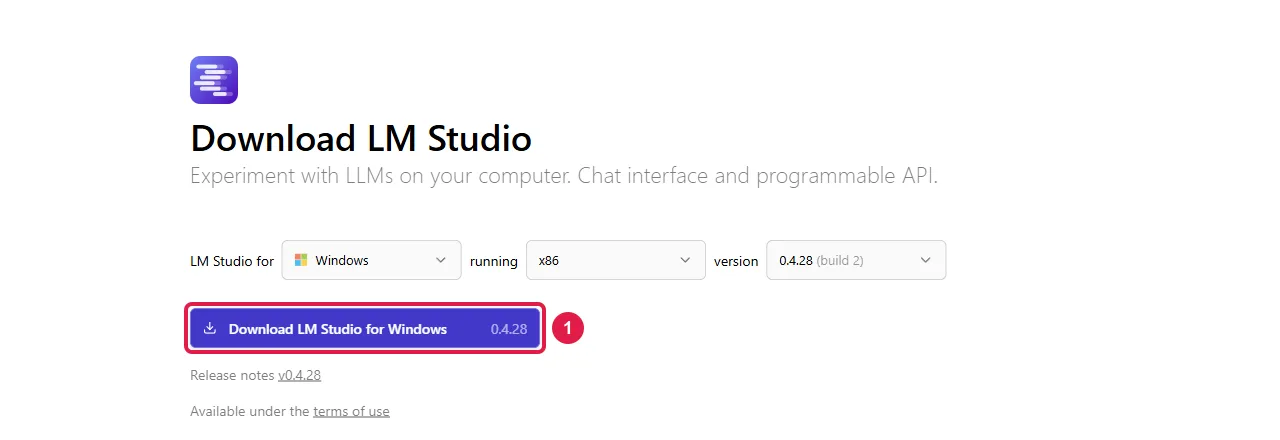
Step 2: Install. Open your Downloads folder (press Windows key + E, then click Downloads), double-click the file that downloaded, and follow the installer's screens.
Step 3: Open it. Press the Start key, type LM Studio, and press Enter.
Install LM Studio on a Mac
Step 1: Open lmstudio.ai/download, check that it shows macOS, and click the download button.
Step 2: Open the downloaded file in your Downloads folder and drag LM Studio onto the Applications folder.
Step 3: Open Applications and double-click LM Studio.
Install LM Studio on Linux
LM Studio for Linux is an AppImage: one file that runs without installing. The steps to run it are from the AppImage documentation.
Step 1: Open lmstudio.ai/download, check that it shows Linux and your processor (x64 or ARM64), and click the download button.
Step 2: Allow it to run. Open your Downloads folder, right-click the .AppImage file and click
Properties. On the Permissions tab, tick Allow executing file as program (in Dolphin, Is
executable). Close the window.
Step 3: Double-click the file to start LM Studio.
The same in a terminal (Ctrl + Alt + T on Ubuntu), one line at a time, pressing Enter after each;
*.AppImage stands for the file you downloaded, so keep only one AppImage in Downloads:
cd ~/Downloads
chmod +x *.AppImage
./*.AppImage
Download a model and chat
These steps are the same on every system, from LM Studio's getting started page.
Step 1: Find a model. Click the Discover tab on the left. Pick one of the suggested models, or type a name such as Gemma 4 or Qwen3.5 in the search box.
Step 2: Pick a size that fits. Each model is offered in several versions; smaller ones need less memory. The tables in how to run an LLM locally list how much memory each model needs. Click the download button next to the version you choose and wait for it to finish.
Step 3: Load it. Click the Chat tab, open the model loader at the top of the window, and select the model you downloaded.
Step 4: Chat. Type a message in the box at the bottom and press Enter. The model runs on your computer; nothing you type is sent to the internet.
Related
- How to run an LLM locally: which models fit in how much memory, with LMArena scores and measured speeds.
- How to install Ollama: the terminal app, with the D: drive setting.
- How to install llama.cpp: the engine LM Studio is built on, for more control.
- How to run an LLM on low-end hardware.
Frequently asked questions
Is LM Studio free?+
Yes, LM Studio is free to download and use for running models on your own computer.
Does LM Studio work on an Intel Mac?+
No. LM Studio’s requirements list Apple silicon (M1 to M4) with macOS 14 or newer, and say Intel-based Macs are not supported.
How do I install LM Studio on Ubuntu?+
Download the AppImage from lmstudio.ai/download, mark it as executable (right-click, Properties, Permissions, Allow executing file as program, or chmod +x in a terminal) and double-click it. LM Studio lists Ubuntu 20.04 or newer.
How much RAM does LM Studio need?+
LM Studio recommends 16 GB of RAM, and on Windows at least 4 GB of dedicated graphics memory. Macs with 8 GB can run smaller models with modest context sizes.