How to Run an LLM on Low-End Hardware
Speeds and commands checked 1 November 2026.
In short: What stops a model from running on an old or cheap computer is memory, not the processor.
A model has to fit in graphics card memory plus RAM, and the part that sits in normal RAM runs much
slower. Four techniques get around that: smaller compressed versions of a model, splitting a model
between the graphics card and RAM (llama.cpp's --n-cpu-moe), loading it one layer at a time from
disk (AirLLM), and speed-up settings such as multi-token prediction and a shorter context. Each is
below with measured speeds and the steps to try it. For the basic install of Ollama or LM Studio, start
with how to run an LLM locally.
What limits speed on low-end hardware
When a model fits entirely in the graphics card, it runs fast. When part of it has to sit in normal RAM, every token waits for that RAM. One 2019 laptop (RTX 2070 Max-Q with 8 GB, Core i7-8750H, 31 GB RAM) ran the same Gemma 4 26B A4B file at three speeds (measurements on GitHub):
| Setup on the same laptop | Speed |
|---|---|
| Processor only | 1.9 tokens per second |
| Graphics card through Vulkan | 4.9 tokens per second |
| Graphics card through CUDA, experts kept in RAM | 23.5 tokens per second |
A token is roughly three quarters of a word, so 2 tokens per second is slower than most people read and 20 is faster.
Measured speeds on low-end hardware
| Model | LMArena rank | Hardware | Speed | Measured by |
|---|---|---|---|---|
| Gemma 4 E2B | - | Raspberry Pi 5 (16 GB), processor | 7.6 tok/s | |
| Gemma 4 E2B | - | Raspberry Pi 5 (8 GB), processor, llama.cpp | 9.03 tok/s; 13.06 with MTP | Marcelo Rovai |
| Gemma 4 E4B | - | Raspberry Pi 5 (16 GB), processor | 3.2 tok/s | |
| Qwen3.5 4B | - | Raspberry Pi 5 (8 GB), processor, llama.cpp | 3.12 tok/s; 4.83 with MTP | Marcelo Rovai |
| Gemma 4 E2B | - | Intel Lunar Lake laptop, processor | 29.8 tok/s | |
| Gemma 4 E4B | - | Intel Lunar Lake laptop, processor | 16.8 tok/s | |
| Gemma 4 E2B | - | Galaxy S26 Ultra, graphics | 52.1 tok/s | |
| Gemma 4 E4B | - | iPhone 17 Pro, graphics | 25.1 tok/s | |
| Llama 3.2 1B | #401 | GTX 1050 Ti (4 GB) | 45.2 tok/s | LocalScore |
| Qwen2.5 14B | - | GTX 1050 Ti (4 GB) | 1.2 tok/s | LocalScore |
| Gemma 4 26B A4B | #101 | RTX 3050 (8 GB) + 46 GB DDR4, experts in RAM | 24.35-33.31 tok/s | xbill on DEV |
| Gemma 4 26B A4B | #101 | 2019 laptop, RTX 2070 Max-Q (8 GB) + 31 GB RAM | 23.5 tok/s (CUDA); 1.9 processor only | GitHub |
| Qwen3.8 27B | #106 | Same 2019 laptop | about 2.5 tok/s | GitHub |
Speeds are generation (decode) speeds in tokens per second, 4-bit versions unless noted.
Google publishes the phone, laptop and Raspberry Pi figures itself, on the LiteRT model cards for Gemma 4 E2B and Gemma 4 E4B. The other rows are community measurements; each links its write-up.
Technique 1: Use a smaller or more compressed version
Model files come in several precisions. A 4-bit version is about a quarter of the full 16-bit size. Google's memory table for Gemma 4 shows the effect:
| Model | 16-bit | 8-bit | 4-bit |
|---|---|---|---|
| Gemma 4 E2B | 11.4 GB | 5.7 GB | 2.9 GB |
| Gemma 4 E4B | 17.9 GB | 8.9 GB | 4.5 GB |
| Gemma 4 12B | 26.7 GB | 13.4 GB | 6.7 GB |
| Gemma 4 26B A4B | 57.7 GB | 28.8 GB | 14.4 GB |
| Gemma 4 31B | 69.9 GB | 34.9 GB | 17.5 GB |
Google also publishes QAT versions, trained to keep their quality at 4-bit. In Ollama they have
-it-qat in the name. To use one, open PowerShell (Windows: press Start, type PowerShell, press
Enter) or Terminal (Mac: Command + Space, type Terminal, Enter), type this line and press
Enter:
ollama run gemma4:e2b-it-qat
Ollama's Gemma 4 tags list it at 4.3 GB, against 10 GB for the
16-bit gemma4:e2b-it-bf16. The same pattern exists for E4B (6.1 GB against 16 GB), 12B, 26B and 31B.
Technique 2: Let the model spill into RAM, and check how much did
Ollama and LM Studio do this on their own: what does not fit in the graphics card goes to normal RAM. To see the split in Ollama, start a model, then open a second PowerShell or Terminal window, type this and press Enter:
ollama ps
The PROCESSOR column shows 100% GPU when everything is on the graphics card, or a split such as
48%/52% CPU/GPU when part is in RAM (Ollama FAQ). The more that sits
on the CPU side, the slower each token. To see the speed, start the model with --verbose and read the
eval rate after each answer:
ollama run gemma4:e2b --verbose
Technique 3: Keep a mixture-of-experts model's experts in RAM (llama.cpp)
Mixture-of-experts (MoE) models, such as Gemma 4 26B A4B, Qwen3.5 35B A3B, DeepSeek and Kimi, use only a few of their "experts" for each token. llama.cpp can keep those experts in normal RAM and everything else on the graphics card. Its server documentation lists the switches:
| Switch | What it does (llama.cpp's own words) |
|---|---|
--cpu-moe | "keep all Mixture of Experts (MoE) weights in the CPU" |
--n-cpu-moe N | "keep the Mixture of Experts (MoE) weights of the first N layers in the CPU" |
-ngl N | "max. number of layers to store in VRAM" (default: auto) |
-c N | size of the context; smaller uses less memory |
This is how an 8 GB RTX 3050 ran Gemma 4 26B A4B at 24.35 tokens per second with 30 expert layers in RAM and 33.31 with 17 in RAM; the author found that each expert layer moved onto the card added about half a token per second (xbill on DEV).
Step 1: Install llama.cpp. Follow how to install llama.cpp (Option 2, the
command-line version). On Windows it is one line in PowerShell: winget install llama.cpp. Open a new
PowerShell or Terminal window afterwards.
Step 2: Start the model with its experts in RAM. Type this as one line and press Enter:
llama-server -hf unsloth/gemma-4-26B-A4B-it-qat-GGUF:UD-Q4_K_XL --n-cpu-moe 20
-hf downloads the file from Hugging Face (about 14 GB for this one) the first time. Wait until the
window says the server is listening.
Step 3: Open the chat. In your browser, open http://127.0.0.1:9931, llama.cpp's built-in chat page, and type a message.
Step 4: Adjust the number. If the window shows an out of memory error, press Ctrl + C to stop it and run Step 2 again with a higher number (more layers in RAM). If it runs, a lower number moves more onto the graphics card and is faster, as long as it still fits.
Technique 4: Load one layer at a time from disk (AirLLM)
AirLLM keeps only one layer of the model on the graphics card and reads the next one from disk as it goes. Its README says this lets "70B large language models run on a single 4GB GPU card — without quantization, distillation, or pruning", and lists about 8 GB of graphics memory for Llama 3.1 405B.
The cost is speed and disk space. The README gives no tokens-per-second figure. One measured test on a 16 GB Mac mini M4 (Kunal Vohra, 2 Oct 2026) got:
| Model | Speed with AirLLM |
|---|---|
| TinyLlama 1.1B | 1.0 second per token |
| Llama 3.1 8B | 19.6 seconds per token (20 tokens in 6.5 minutes) |
The same test notes that AirLLM needs about twice the model's size in free disk space, because it keeps the download and a copy split into layers. It suits jobs where a slow answer is acceptable, not chat.
To try it: how to install AirLLM has every step: installing Python, then
pip install airllm, then a short script that loads Qwen3 8B. On a Mac, AirLLM's README supports
Apple silicon with Llama-style models only.
Technique 5: Speed-up settings
Multi-token prediction (MTP) and speculative decoding. A small "draft" model guesses the next few tokens and the main model checks them. On a Raspberry Pi 5, Gemma 4 E2B went from 9.03 to 13.06 tokens per second (Marcelo Rovai); on a Galaxy S26 Ultra's graphics, Google measured Gemma 4 E2B at 51.5 tokens per second without it and up to 91.7 with it. Google's Gemma 4 overview says every Gemma 4 size ships with a draft model for this.
A shorter context. The conversation is kept in memory too. On the RTX 3050 test, Gemma 4 26B A4B wrote
33.7 tokens per second with an empty conversation and 22.8 with 65,536 tokens held. Ollama's default
context is 4,096 tokens; it is set with the OLLAMA_CONTEXT_LENGTH environment variable
(Ollama FAQ).
Close other programs. A browser with many tabs can hold several GB of RAM that the model could use.
Phones and a Raspberry Pi
Phones. Google's AI Edge Gallery app runs models on the phone itself, with no internet once a model is downloaded. It needs Android 12 or newer, or iOS 17 or newer.
- Open Google Play (Android) or the App Store (iPhone) and tap Install (or Get).
- Open the app and pick a model from its list; it downloads to the phone.
- Open a chat and type a message.
Raspberry Pi. Ollama's Linux page includes ARM64 builds, the kind a 64-bit Raspberry Pi OS runs. Open the terminal, paste this line, press Enter, and type your password if asked:
curl -fsSL https://ollama.com/install.sh | sh
Then ollama run gemma4:e2b starts the model Google measured at 7.6 tokens per second on a Raspberry Pi
5 (16 GB).
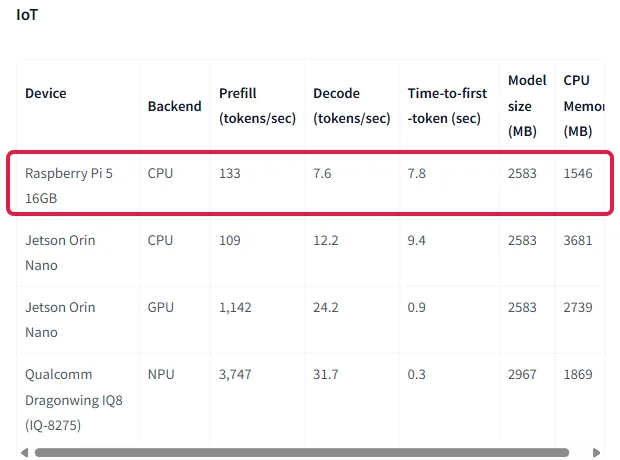
Google's figure is for its own LiteRT-LM engine; the llama.cpp measurement on a Raspberry Pi 5 (8 GB) in the table above was 9.03 tokens per second.
Related
- How to install llama.cpp and how to install AirLLM: the install guides for the techniques above.
- How to run an LLM locally: which models fit in how much memory, the largest open models (Kimi, DeepSeek, GLM), and the full Ollama and LM Studio install.
- Mixture of experts (MoE) explained: why only some parameters work on each token.
- Run open models locally: llama.cpp, Ollama and vLLM.
Frequently asked questions
Can I run an LLM on 4 GB of VRAM?+
Yes, small models fit. LocalScore lists Llama 3.2 1B at 45.2 tokens per second on a GTX 1050 Ti with 4 GB, and Google lists Gemma 4 E2B at 2.9 GB in 4-bit. Larger models spill into normal RAM and slow down: Qwen2.5 14B ran at 1.2 tokens per second on the same card.
Can I run an LLM on the CPU only?+
Yes. Google measured Gemma 4 E2B at 29.8 tokens per second on an Intel Lunar Lake laptop processor and 7.6 on a Raspberry Pi 5. A 2019 laptop ran Gemma 4 26B A4B at 1.9 tokens per second on its processor alone.
Can a 70B model run on a 4 GB graphics card?+
AirLLM says it can, by loading one layer at a time from disk. The cost is speed: a measured test on a 16 GB Mac mini took 19.6 seconds per token for an 8B model, and it needs about twice the model size in free disk space.
What does --n-cpu-moe do in llama.cpp?+
It keeps the mixture-of-experts weights of the first N layers in normal RAM while the rest runs on the graphics card. With it, an 8 GB RTX 3050 ran Gemma 4 26B A4B at 24 to 33 tokens per second.
Can I run an AI model on my phone?+
Yes. Google’s AI Edge Gallery app (Android 12+, iOS 17+) runs models on the phone. Google measured Gemma 4 E2B at 56.5 tokens per second on an iPhone 17 Pro and 52.1 on a Galaxy S26 Ultra, on the graphics.