How to Install AirLLM
Steps checked against AirLLM’s README and Python’s documentation on 1 November 2026.
In short: AirLLM is a free Python library that runs a large AI model by loading one layer at a time from disk, so the whole model never has to fit in memory. Its README says this lets "70B large language models run on a single 4GB GPU card". The cost is speed: one measured test took 19.6 seconds per token for an 8B model, and it needs about twice the model's size in free disk space. Below: installing Python, installing AirLLM, and running a first model, step by step.
Before you start
| What to know | |
|---|---|
| Speed | Measured on a 16 GB Mac mini M4: TinyLlama 1.1B at 1.0 second per token, Llama 3.1 8B at 19.6 seconds per token, 20 tokens in 6.5 minutes (Kunal Vohra, 2 Oct 2026). The README gives no speed figure. |
| Disk | About twice the model's size, because AirLLM keeps the download and a copy split into layers (same test). |
| Mac | The README says only Apple silicon is supported, and only Llama-style models (LlamaForCausalLM, MistralForCausalLM) run on macOS for now. |
| Windows | The README has no Windows-specific notes. |
AirLLM suits jobs where a slow answer is acceptable, not chat. For chat on modest hardware, see how to run an LLM on low-end hardware.
Step 1: Install Python
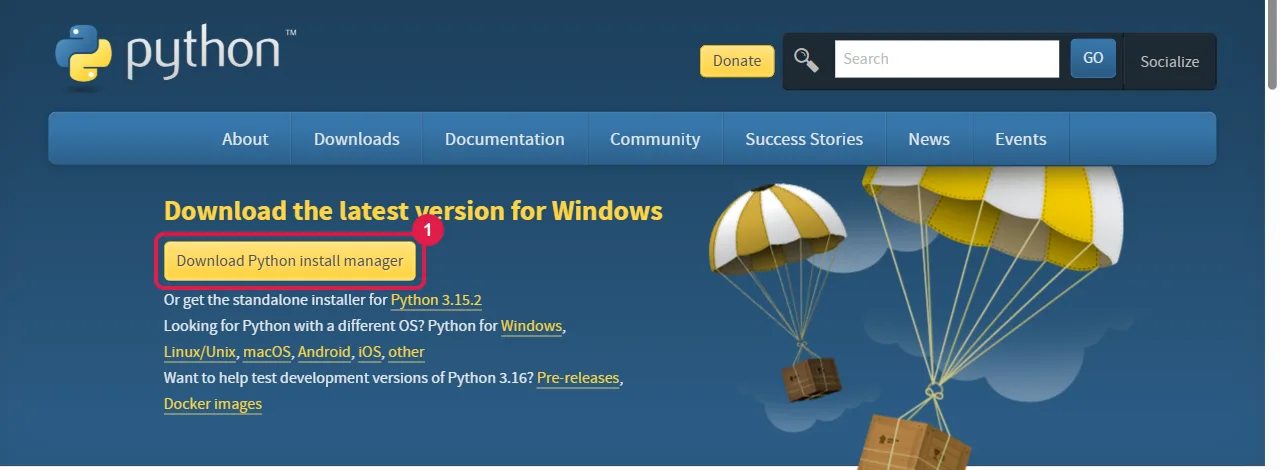
Windows. Open python.org/downloads and click Download Python install manager (box 1). Open your Downloads folder, double-click the downloaded file and click Install. This is the installer Python now offers for Windows; the older standalone installer is not made for Python 3.16 or later (Python on Windows).
Mac. Open python.org/downloads, click the download button for macOS, open the downloaded file and follow its steps.
Linux (Ubuntu). Ubuntu comes with Python, but recent versions refuse pip installs into the system
Python, so AirLLM goes into its own folder (a "virtual environment", from Python's
venv tool). Open a terminal (Ctrl + Alt + T) and run
these one at a time, pressing Enter after each and typing your password if asked:
sudo apt install python3-venv python3-pip
python3 -m venv ~/airllm-env
source ~/airllm-env/bin/activate
After the last line, python and python -m pip in that window use the new folder. In a new terminal
window, run the source line again first.
Step 2: Open a terminal and start Python once
- Windows: press the Start key, type PowerShell, and press Enter.
- Mac: press Command + Space, type Terminal, and press Enter.
- Linux (Ubuntu): press Ctrl + Alt + T.
Type this and press Enter. It prints a version such as Python 3.x.x:
python --version
On Windows, the first time you run python the install manager downloads the latest Python by itself;
wait for it to finish. If it offers to add a folder to your PATH, that is optional. On a Mac or Linux, if
the command is not found, use python3 in place of python in the steps below.
Step 3: Install AirLLM
Type this and press Enter. It downloads AirLLM and the libraries it needs, which can take several minutes:
python -m pip install airllm
python -m pip is the form Python's Windows documentation recommends over a bare pip command. On a Mac,
the AirLLM README also asks for mlx and torch:
python -m pip install mlx torch
Step 4: Write the script
Open Notepad (Windows) or TextEdit (Mac; choose Format > Make Plain Text first). Paste the
lines below and save the file as airllm_test.py in your Documents folder. It is the example from
AirLLM's README, shortened, with Qwen3 8B in place of the README's Qwen3 32B so the first download is
smaller:
from airllm import AutoModel

model = AutoModel.from_pretrained("Qwen/Qwen3-8B")
input_tokens = model.tokenizer(["What is the capital of United States?"],
    return_tensors="pt", return_attention_mask=False, truncation=True, max_length=128, padding=False)
output = model.generate(input_tokens["input_ids"].to(model.device),
    max_new_tokens=20, use_cache=True, return_dict_in_generate=True)
print(model.tokenizer.decode(output.sequences[0]))
In Notepad, set Save as type to All files so the file is not saved as airllm_test.py.txt.
Step 5: Run it
In the terminal, type these two lines, pressing Enter after each:
cd Documents
python airllm_test.py
The first run downloads the model and splits it into layers, which takes a long time and the disk space
described above. Then it prints the question followed by the answer, up to 20 tokens (max_new_tokens).
Make it smaller with compression
AirLLM can compress each layer as it loads. The README lists 4bit and 8bit ("block-wise
quantization"); the default is no compression. It needs the bitsandbytes library; install it first, then change the model line in the script:
python -m pip install -U bitsandbytes
The changed line:
model = AutoModel.from_pretrained("Qwen/Qwen3-8B", compression="4bit")
Related
- How to run an LLM on low-end hardware: AirLLM next to the faster techniques, with measured speeds.
- How to install llama.cpp: splits a model between the graphics card and RAM instead, much faster for chat.
- How to run an LLM locally: which models fit in how much memory.
Frequently asked questions
What is AirLLM?+
A free Python library that runs large language models by loading one layer at a time from disk. Its README says 70B models can run on a single 4 GB graphics card.
How fast is AirLLM?+
Slow. A measured test on a 16 GB Mac mini M4 took 1.0 second per token for TinyLlama 1.1B and 19.6 seconds per token for Llama 3.1 8B. The README gives no speed figure.
Does AirLLM work on a Mac?+
On Apple silicon only, and the README says only Llama-style models (LlamaForCausalLM, MistralForCausalLM) run on macOS for now. It also asks for mlx and torch to be installed.
How much disk space does AirLLM need?+
About twice the model’s size, because it keeps the download and a copy split into layers.